Raven is a pentest framework that keeps you in control. Set scope, discover assets, choose your tests, and carry results into findings, evidence, and reports in one local workspace. The individual app is free to run without an account or AI credits. AI is optional.
Keep targets, exclusions, and engagement context together.
02
Discover assets
Build the host and service inventory from scans and imports.
03
Choose the next test
Select targets, prepare a tool or workflow, and review where it runs.
04
Keep the evidence
Connect observations and manual work to findings you can review.
05
Deliver the work
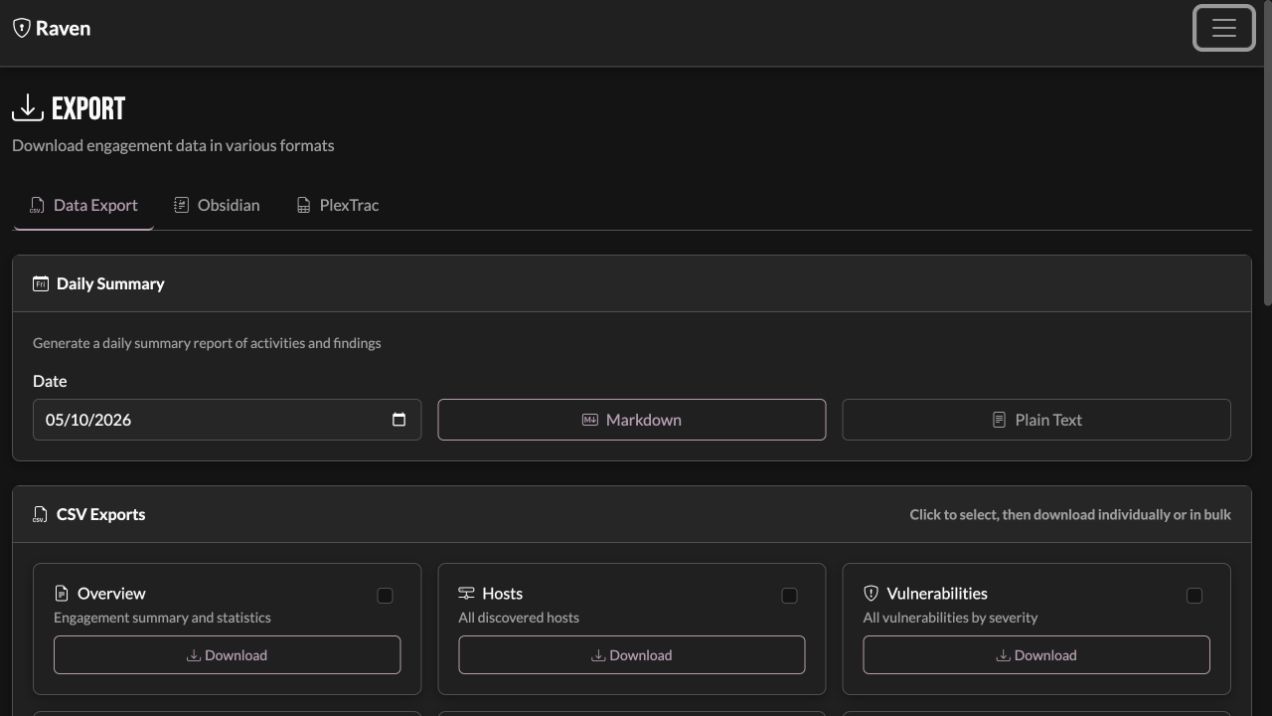
Write the report or export into the reporting process you already use.
Your engagement determines the tests. For example: discover open ports, then send the discovered web services to GoWitness. Smart scoping carries relevant results forward; you choose which checks to run.
Built for pentesters, by pentesters
Use your tools and your judgment. Raven connects the scope, discovered assets, tool runs, findings, and evidence so the work is easier to follow and carry into a report.
Keep the engagement together
Scope, hosts, services, findings, evidence, credentials, and notes stay with the engagement. Open an asset or finding to follow the results and supporting material behind it.
Bring in the tools you already use
Save a reusable command wrapper or import a tool profile. Choose its execution machine and parser, then review the command and exact targets before running. Use an alternative for a supported bundled check, or import existing output and review how it maps into hosts, ports, paths, and findings.
Work with your reporting flow
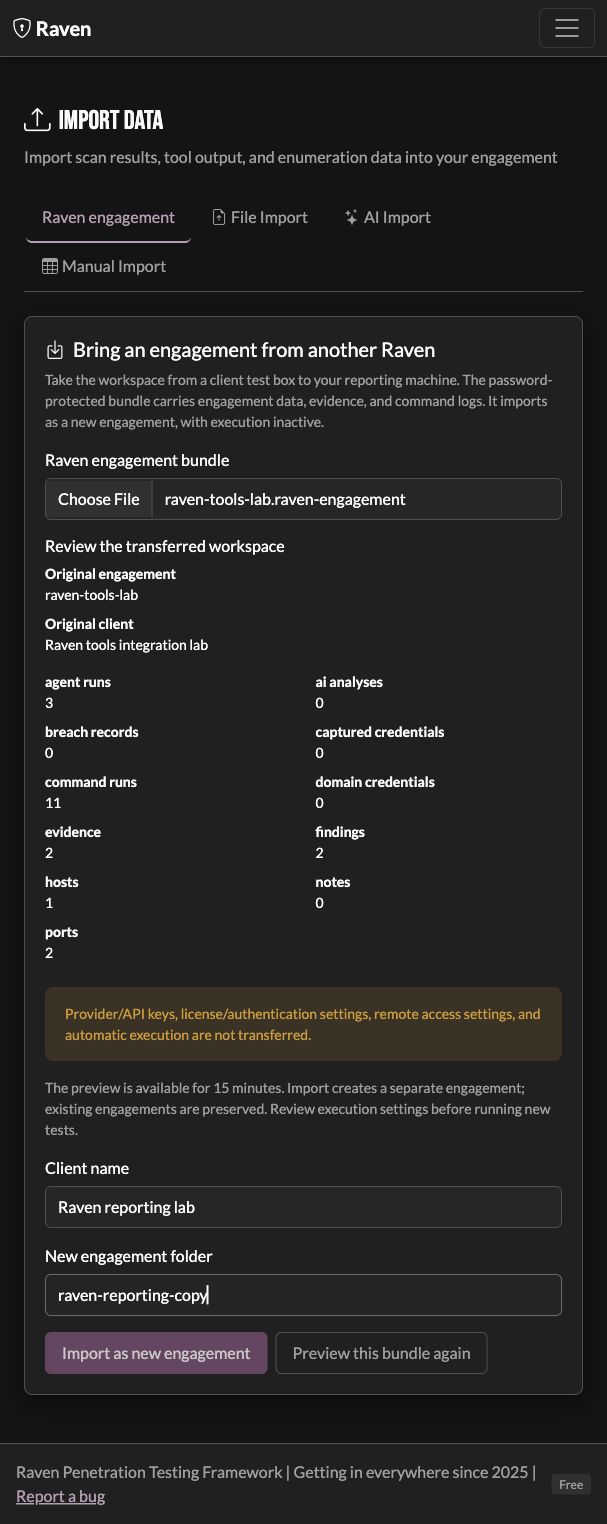
Export the engagement you are reviewing in supported formats, or move an encrypted engagement bundle from the test box to your local Raven for reporting. Review its contents before importing a separate copy with its evidence and command history. Imported testing stays inactive.
Deliver a report without AI
Build a basic engagement report from scope, methodology, host inventory, and findings by severity. Export markdown or PDF without spending AI credits.
Run familiar testing tools
Launch tools such as Nmap, Nuclei, Subfinder, and GoWitness from Raven. Track jobs and output, and use supported parsers to bring results into the engagement.
Choose tests from the discoveries
Filter discovered assets by service, select the targets you want, and prepare a tool or workflow. Service discoveries help you decide which checks make sense; you choose which optional tests to run.
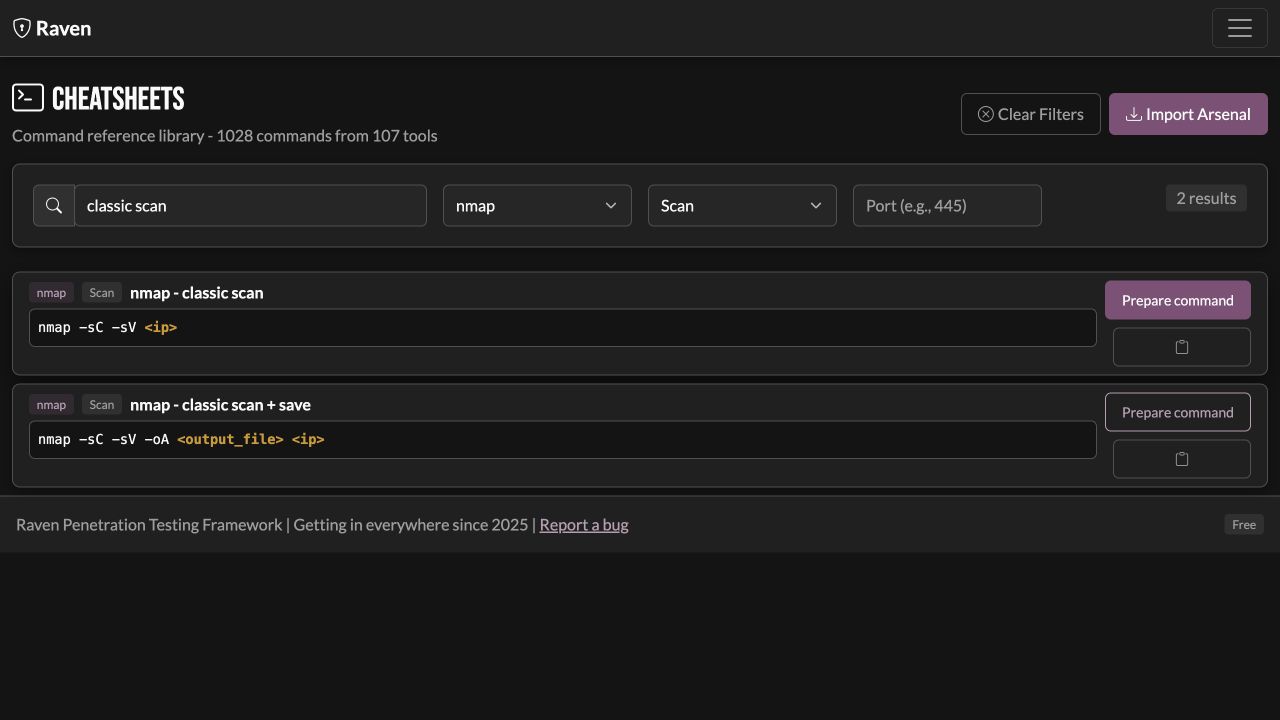
Keep a LOTL reference close by
Search cheatsheets and references including LOLBAS, GTFOBins, LOOBins, WADComs, LOLDrivers, and HijackLibs. Open an example as an editable Tools draft, replace its variables, and review it before testing. Use Back to return to your search, filters, and selected reference in the engagement.
Follow an engagement
From the first target to the final writeup, keep the next action connected to what you have already found.
Raven interface · sample lab engagement
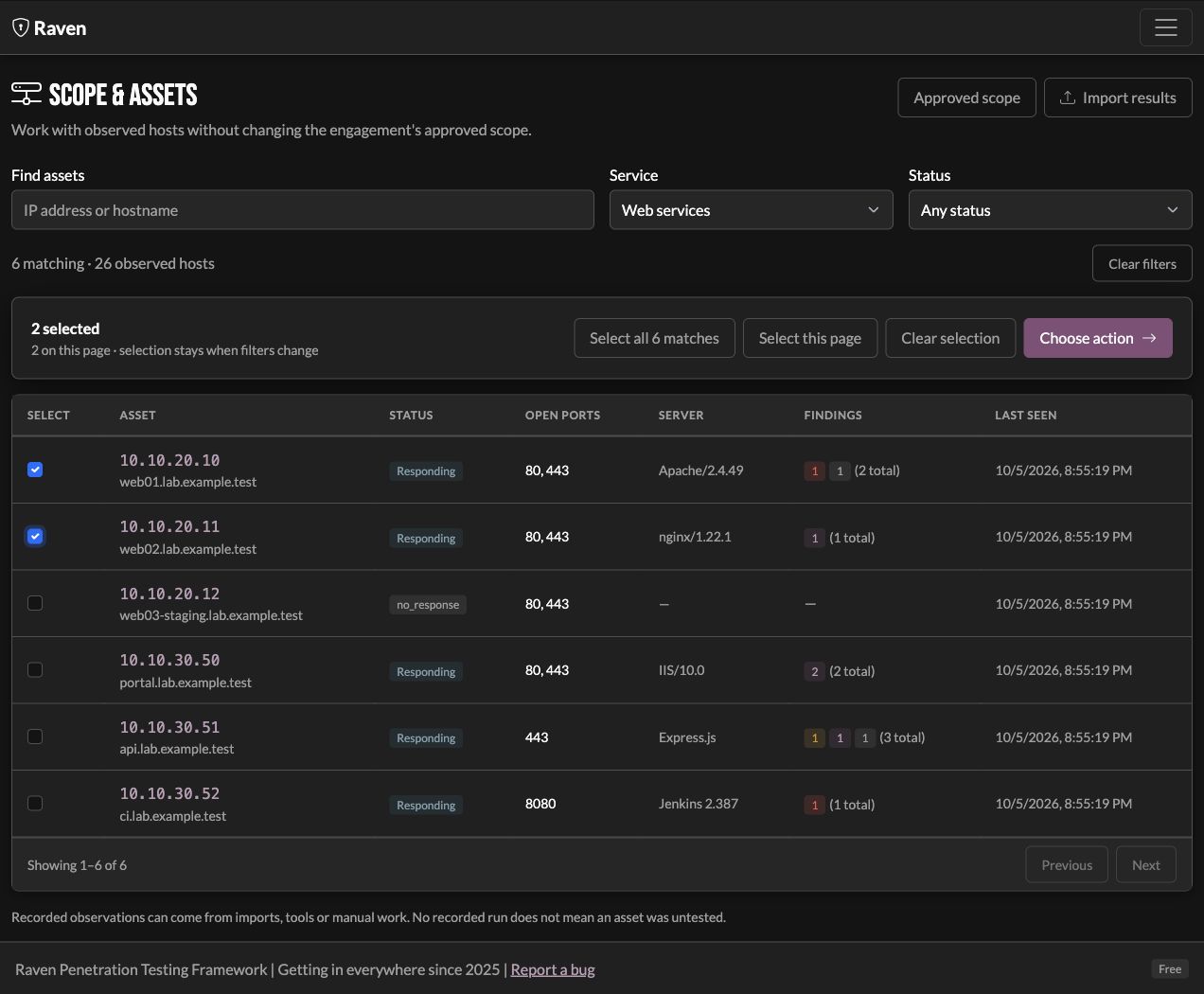
Scope & discovery
Start with the assets in this engagement
Set the scope, then build an inventory of discovered hosts, ports, and services. Filter by what is relevant to the next test and select the assets you want to work with.
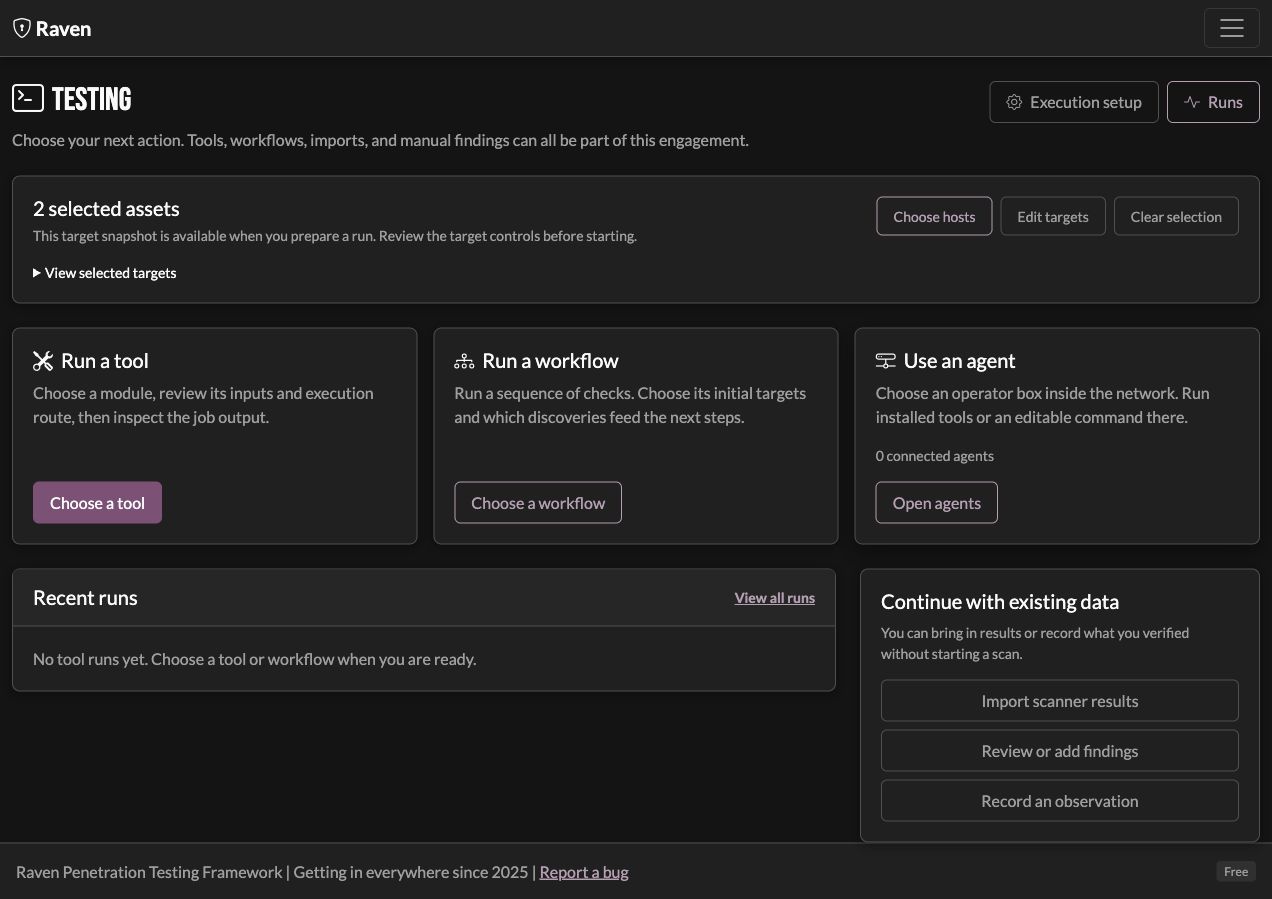
Testing
Prepare the next test before you run it
Choose a tool, workflow, or agent command. Review the targets and execution location, then start the run. Discovery helps narrow the next check; you do not have to run every test in a fixed sequence.
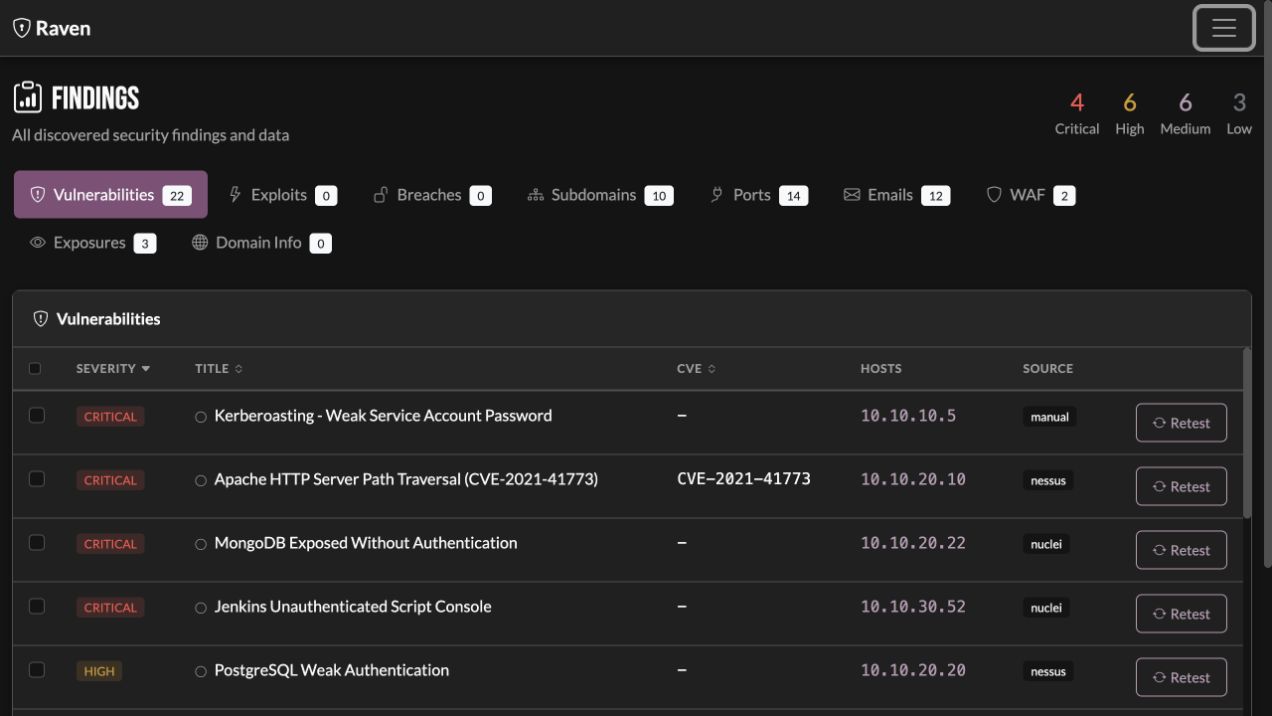
Findings & evidence
Carry the result into a finding
Bring supported scanner results and manual observations into the findings view. Keep affected assets, source, severity, notes, and evidence together so you can assess what the result demonstrates.
Review & delivery
Turn the reviewed work into a deliverable
Review findings and their evidence, generate a basic report, or export to the reporting flow you already use. Managed AI can help draft text when you want it; the report does not depend on a model call.
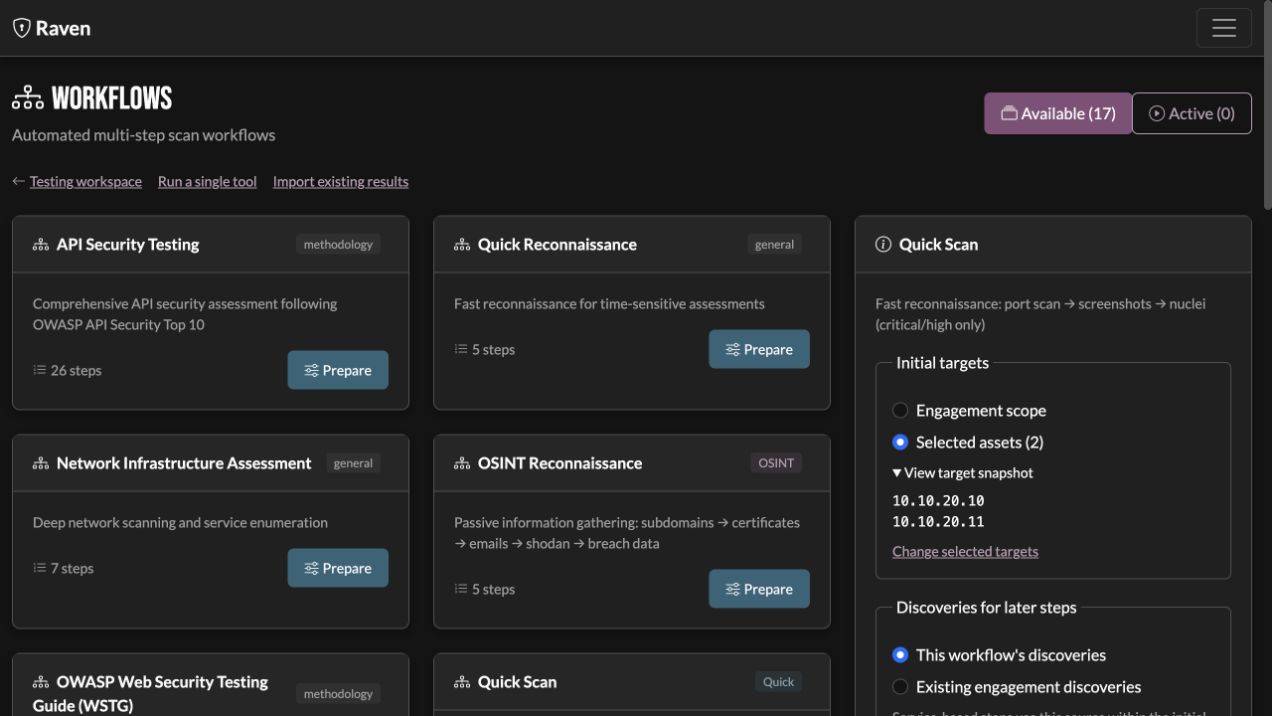
Workflows
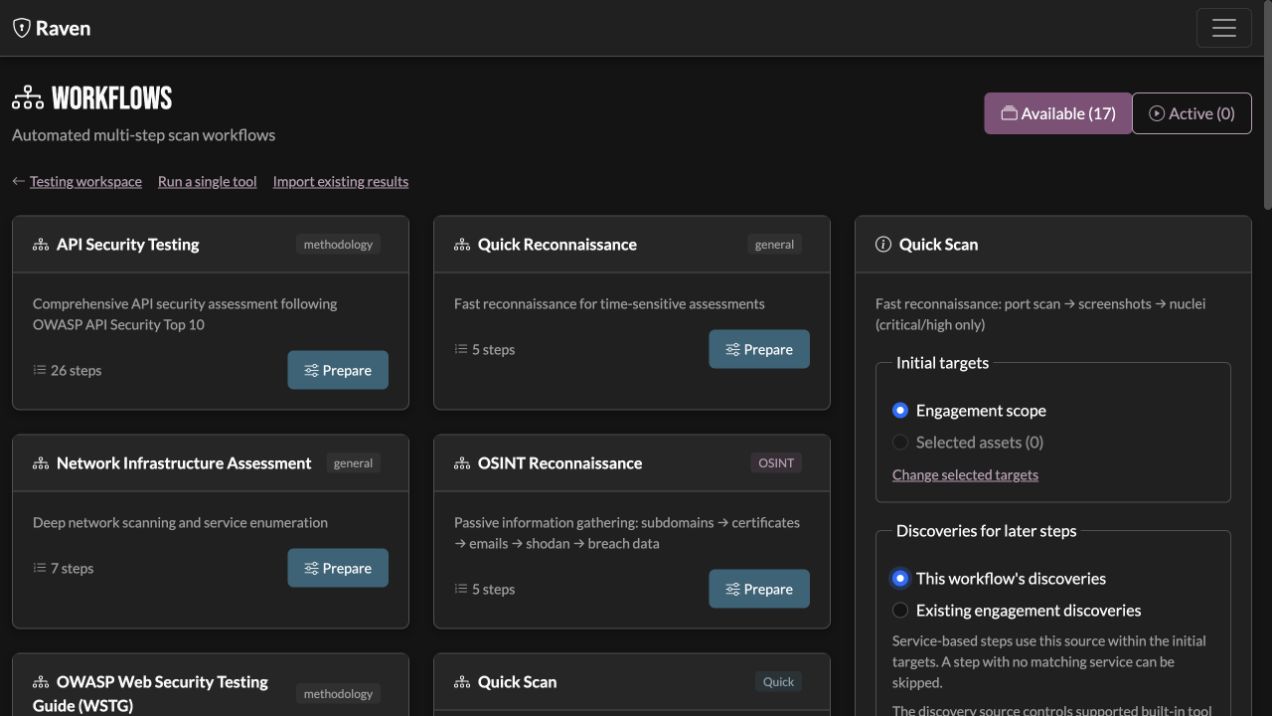
Connect discoveries to the next step
Choose a workflow template or build a sequence of your own. Follow step progress and results, and use discovered services to decide where more testing is worthwhile. The workflow supports your plan; you stay in control of the tests.
Existing work
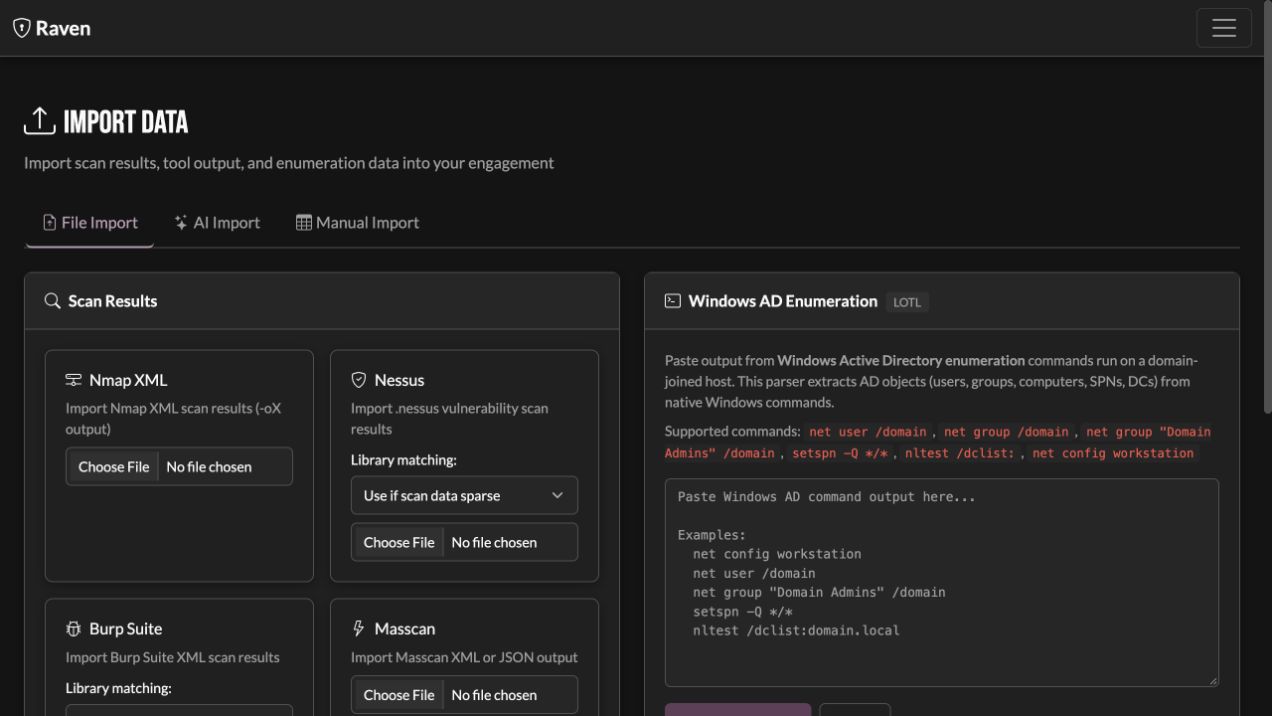
Already ran the scan? Bring it in.
Import results from supported tools and keep testing from there. Manual findings and notes belong in the same engagement, too. Raven fits around the work you have already done.
Your tools
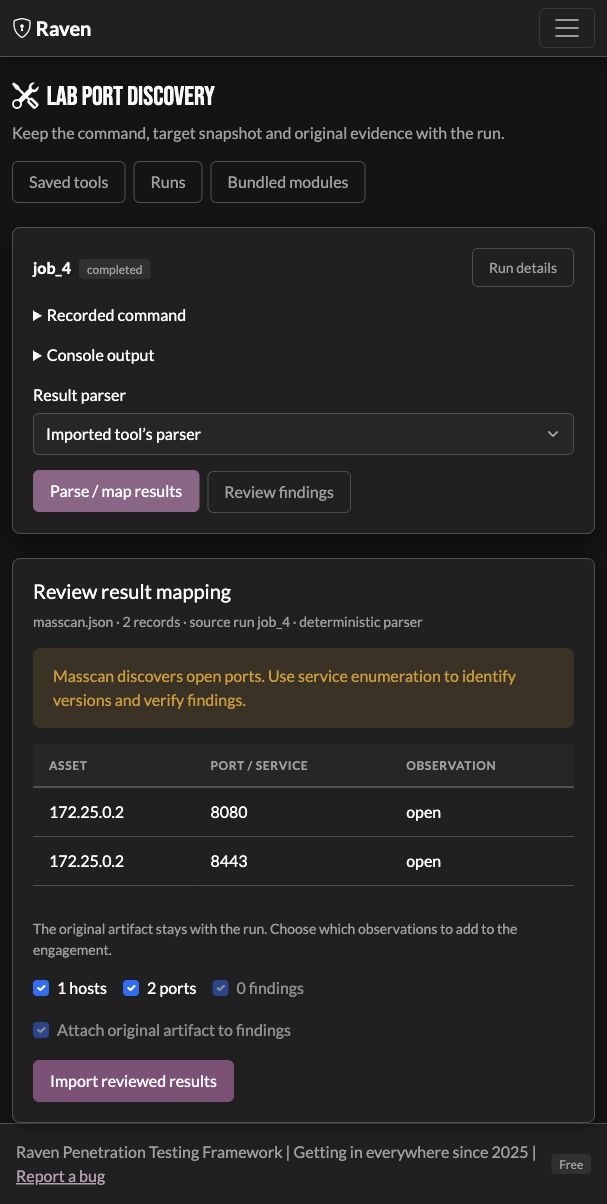
Keep the command and the result connected.
Import a tool profile or prepare your own command. Choose where it runs, review the targets, and map supported output into the engagement. Each attempt keeps its own evidence, even when you replace the saved tool.
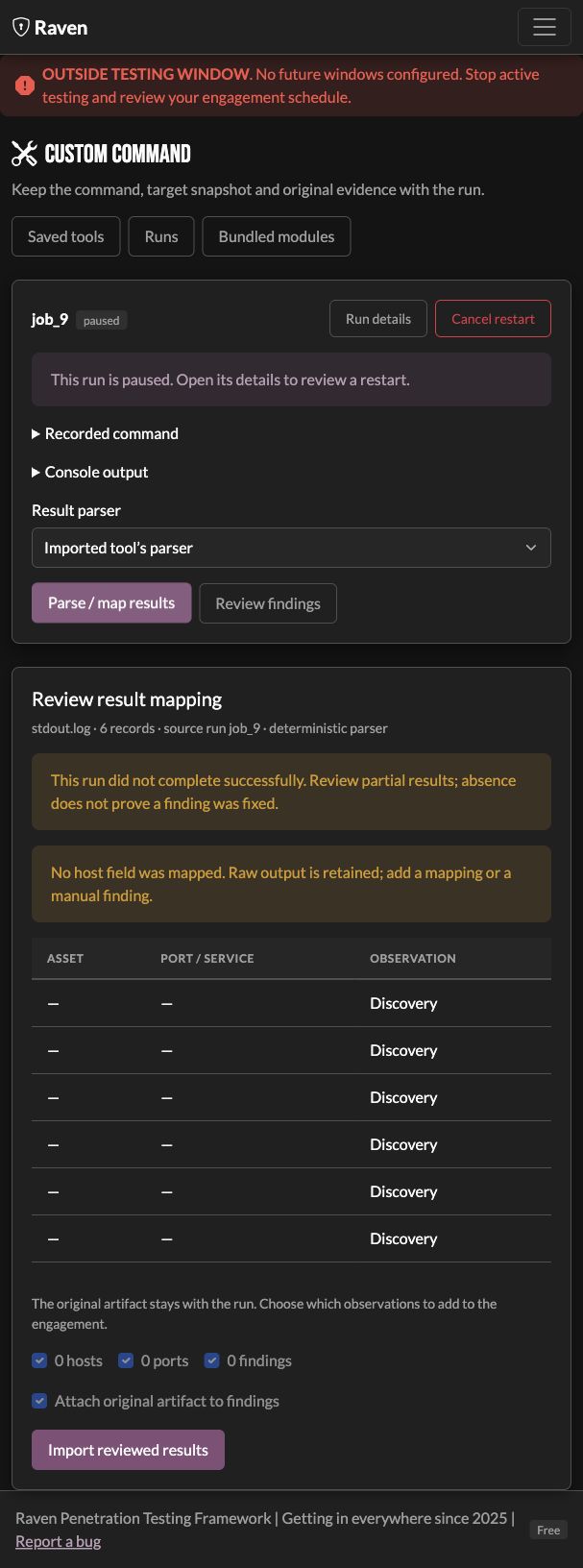
Testing windows
Plan the opening. Keep the interrupted evidence.
Queue a supported run for the next window. Enforcement requests a stop at closing, retains partial output, and lets you review a fresh restart. Eligible commands can restart automatically when you explicitly choose that setting.
Research into testing
Find the example. Prepare your check.
Search cheatsheets or platform references, then open the command as an editable Tools draft. Replace example variables and review the execution machine and targets before starting.
Test box to reporting machine
Bring the engagement home.
Export an encrypted engagement bundle from the machine where you tested, move it through the client's approved file-transfer method, and preview it in local Raven. Import a separate reporting copy with its findings, evidence, and command history. Saved testing remains inactive.
Internal & AD testing
Keep the internal work in the engagement.
Connect an agent on your RTA or configure an SSH jumpbox for internal testing. Keep execution, captured credentials, AD observations, and findings in the same engagement. No AI is required.
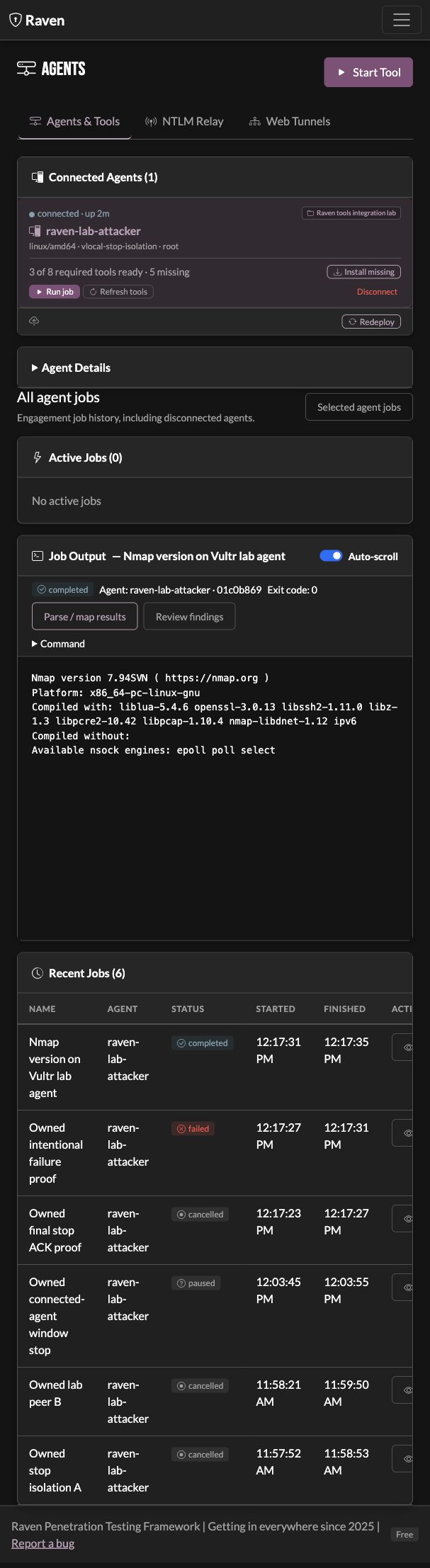
Execution visibility
Know where the command will run
See connected agents, their status, and available tools. Choose the agent for a command, then follow its output and exit status. Review retained results from the recorded run. After opening result mapping, use Back to return to the same selected job and history view in the engagement.
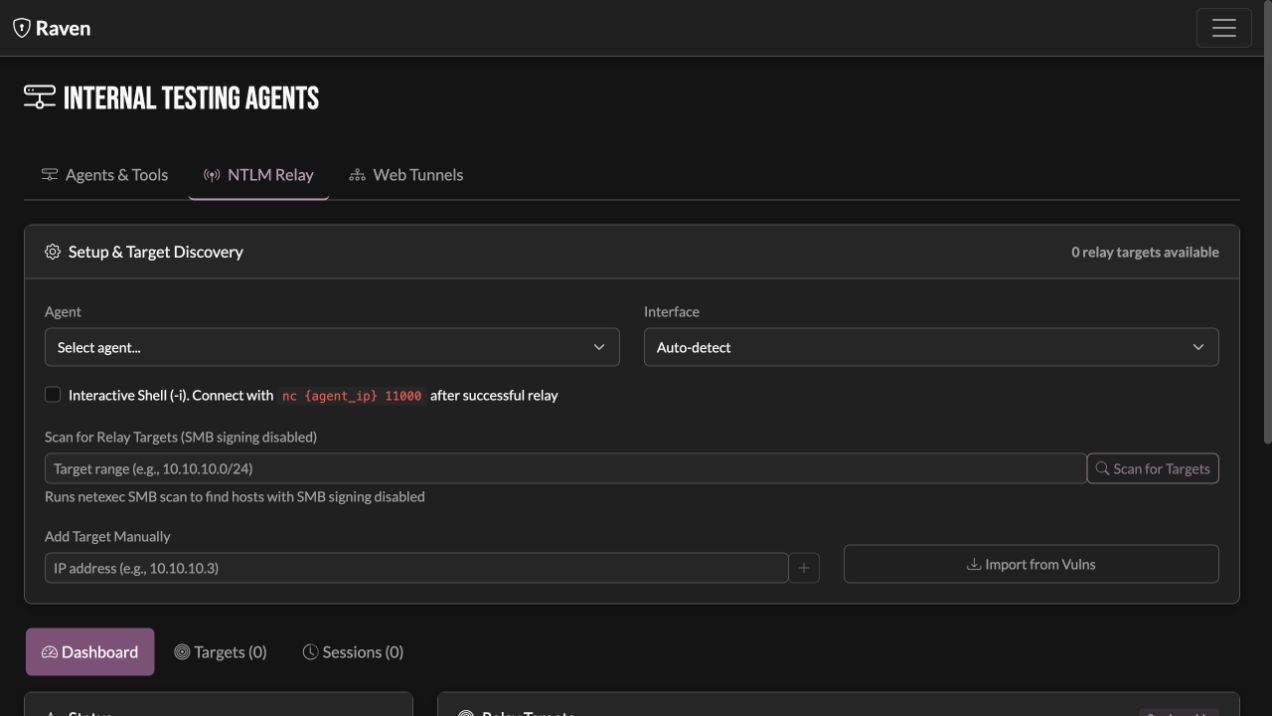
NTLM relay
Prepare Responder and ntlmrelayx from Raven
Use discovered SMB signing information to prepare relay targets. Choose the agent, review the commands, and follow Responder and ntlmrelayx output from the dashboard. Coercion is available as a separate testing choice when the engagement calls for it.
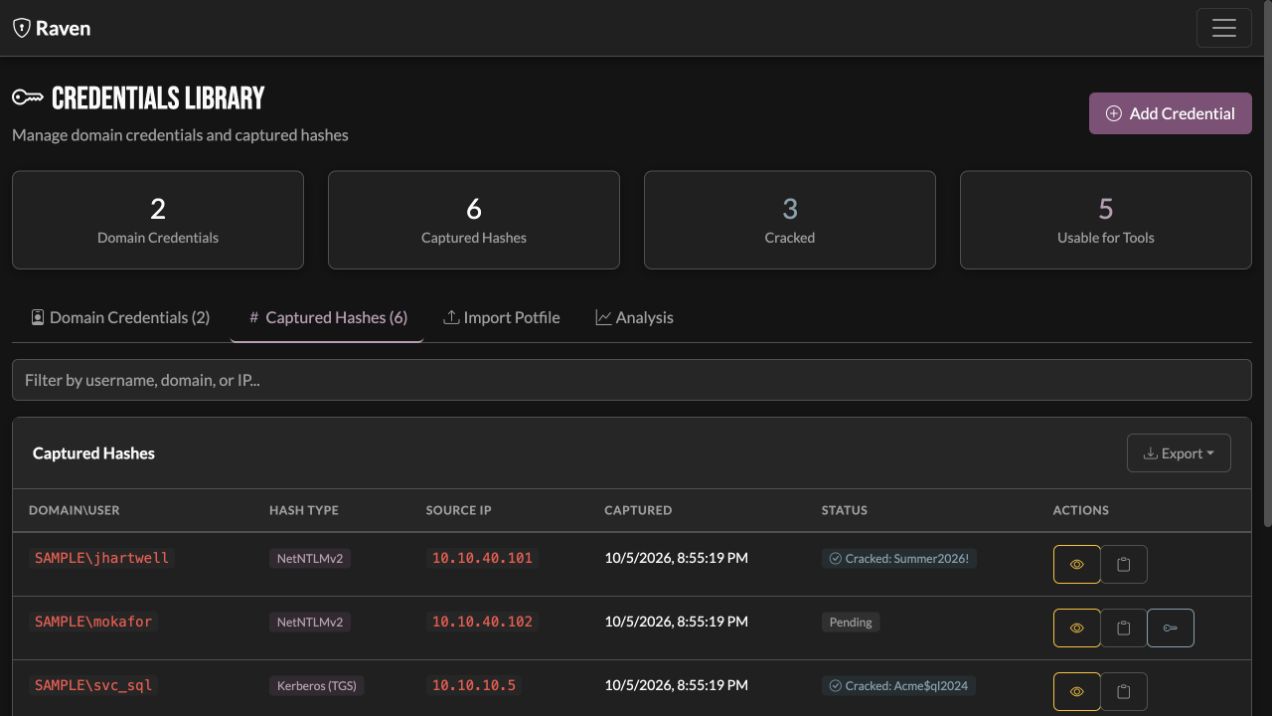
Captured credentials
Keep captures and recovered credentials together
Collect supported NetNTLM and Kerberos captures in the credential library. Review and deduplicate them, send supported hashes to your configured cracking tools, and keep recovered credentials with the rest of the engagement data.
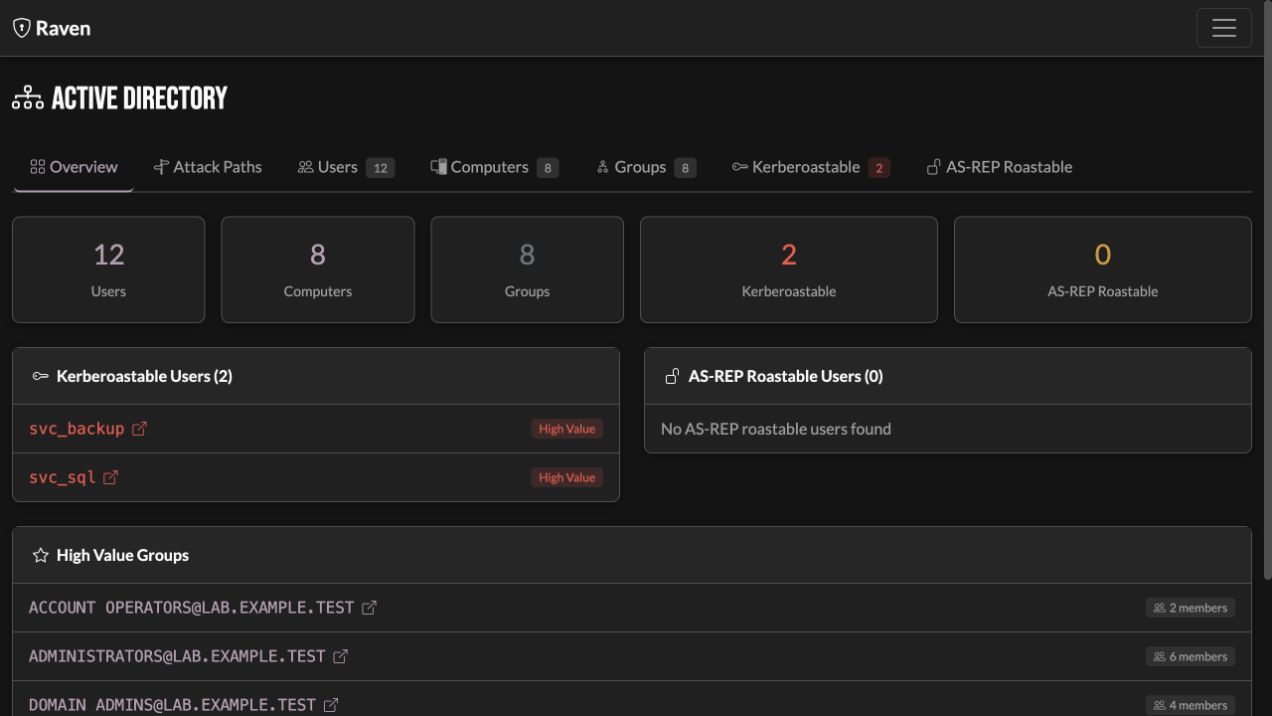
Active Directory paths
Follow the relationships in your AD data
Bring in a BloodHound collection and examine accounts, delegation, and candidate attack paths alongside the engagement findings. Use the graph and supporting observations to decide which relationships to investigate next.
Choose the execution location
Run tools on a connected agent or remote SSH host, or route supported local tools through a SOCKS tunnel. Review the execution mode before launching the test.
Internal testing, connected
Work with Responder, ntlmrelayx, Coercer, NetExec, and Kerberos testing tools. Follow the command output and bring supported credential captures into the engagement.
Configure testing windows
Explicitly queue a supported run for the next eligible opening. Warnings let commands continue; enforcement blocks outside-window launches and requests stops at closing. Review before restarting, or opt into automatic restart at reopening for eligible commands after exit is confirmed. Each repeat is a new attempt; partial evidence stays with the original run.
Your AI, your choice
Use AI when it helps the work.
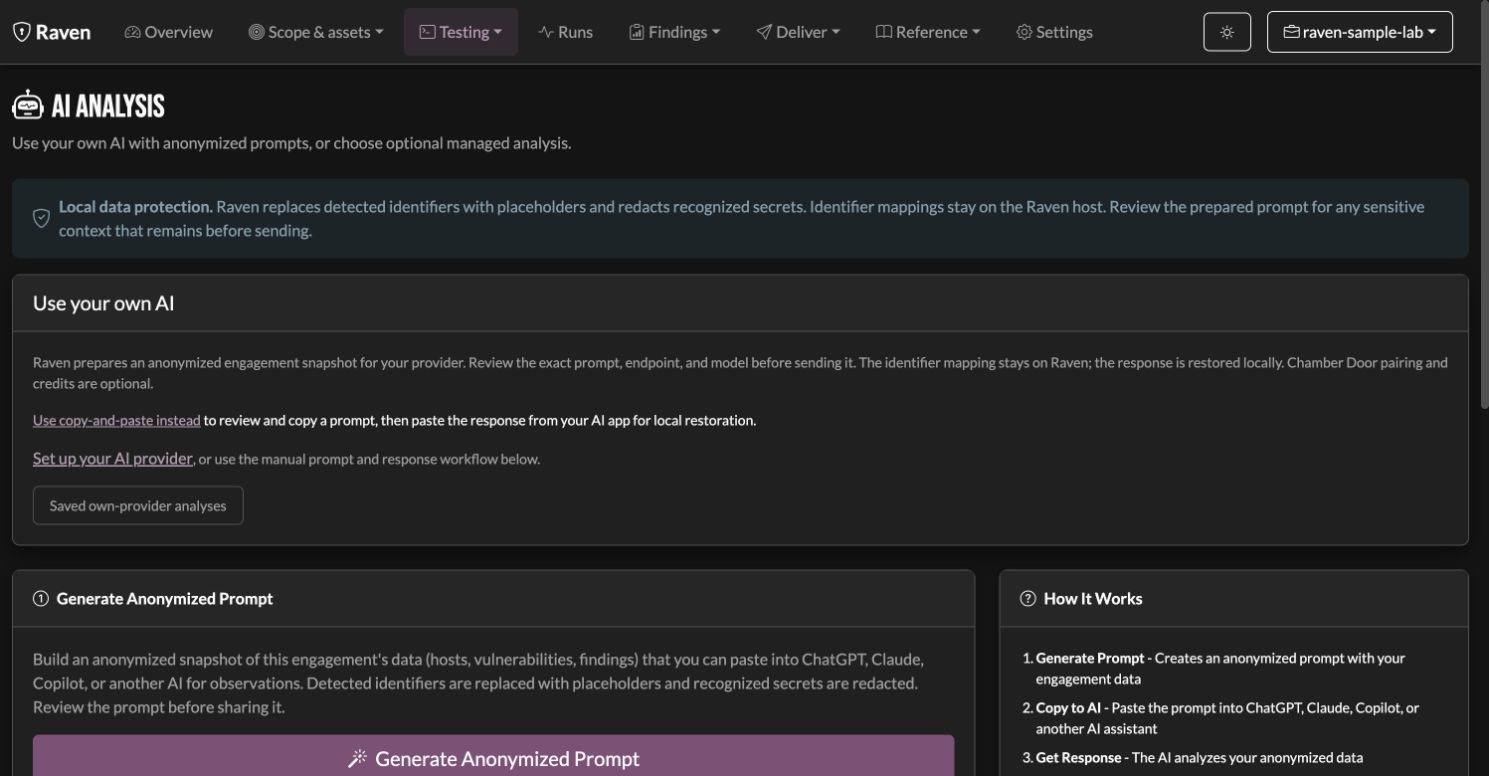
Review an anonymized engagement snapshot before sending it to your own provider or compatible local model. Optional managed AI supports the advisor, chat, finding drafts, and report text.
Engagement-aware analysis
Your findings give the analysis its context
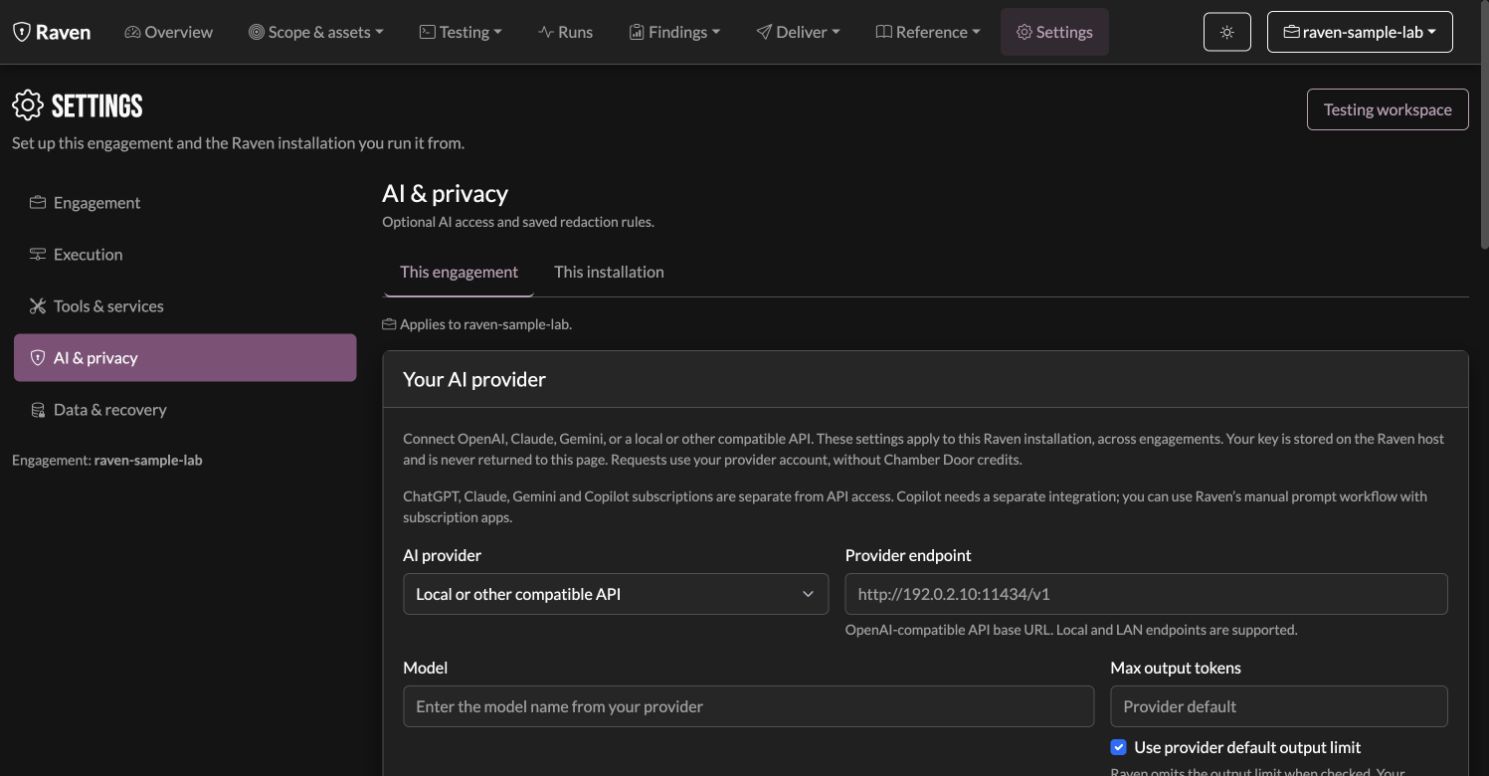
Choose OpenAI, Claude, Gemini, or a compatible API for engagement analysis. Compatible API servers can run local models. Review the prompt, endpoint, and model before sending. Raven restores recognized response placeholders on your Raven host. BYO requests use your provider account, with any provider charges. Prefer your existing AI app? Copy the anonymized prompt and paste the response back without Chamber Door pairing or credits.
Local privacy preview
Try the rules before you share.
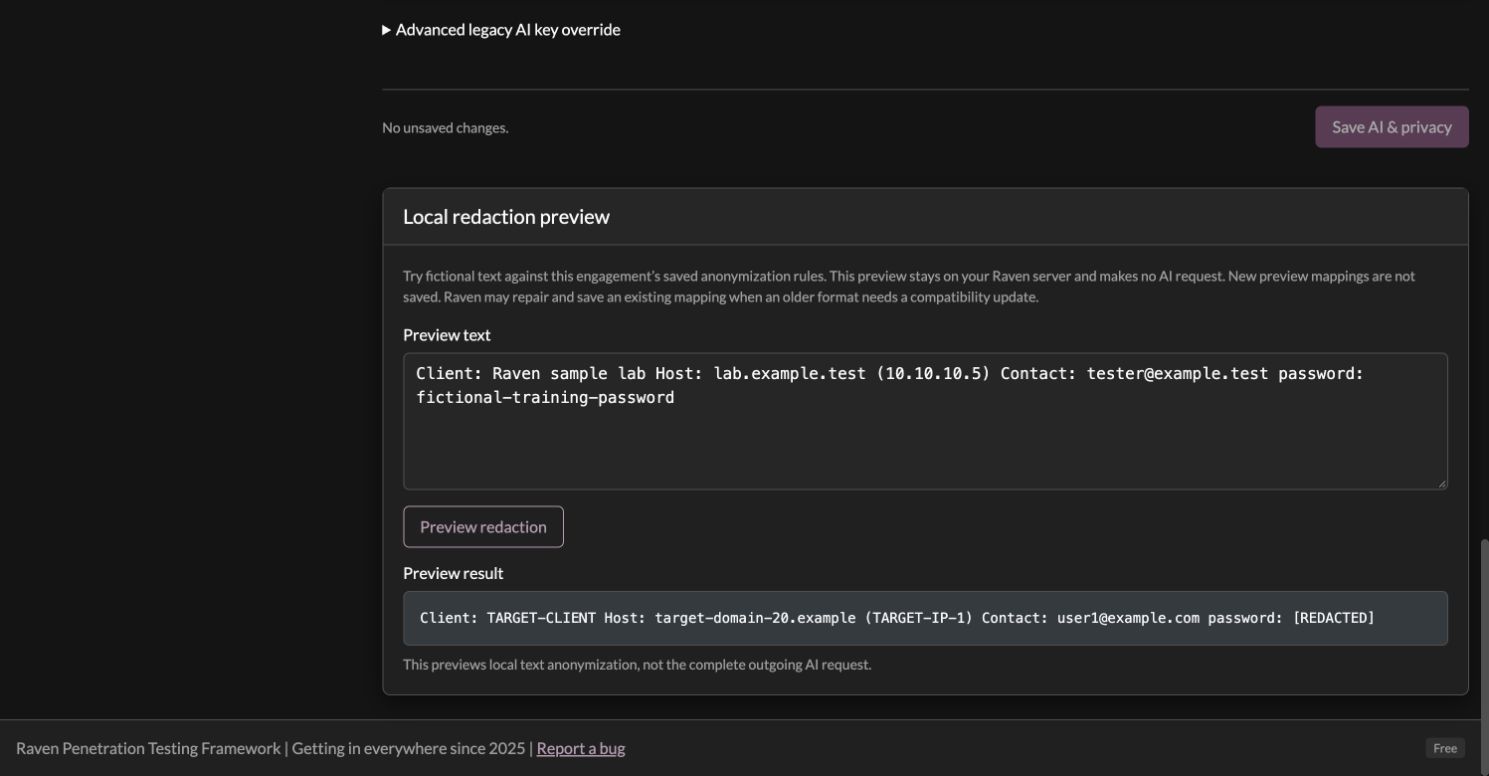
Add engagement-specific aliases, locations, and sensitive terms. Test fictional text against the saved rules in Raven’s local redaction preview, without sending a request to an AI provider.
Raven replaces known client identifiers with placeholders and redacts recognized credential formats before AI analysis. The example below is illustrative: it shows substitutions, not a complete request. Redaction cannot guarantee that every identifying detail is removed. Save your privacy rules, preview fictional text locally, and review the request before sharing it.
// example substitutions; request format varies by action
{
"content": "Client TARGET-CLIENT (target-domain-1.example).
host host-1 at TARGET-IP-1: SMB null session, dumped SAM.
captured DOMAIN\user-1; cracked [REDACTED].
NTLM [REDACTED-HASH]. kerberoasted svc_account1.
contact user1@target-domain-1.example.
give findings-grounded next steps + a risk rating."
}
In this example, known identifiers become stable placeholders while technical context (SMB, NTLM, Kerberos) remains useful. Recognized secrets are redacted. Unregistered names, unusual secret formats, and identifying technical context can remain. Review the request and your chosen provider’s data handling before sharing it.
Hover or tap any value to trace it across the boundary.
Raven keeps the identifier mapping with the engagement and uses it to restore recognized placeholders in returned text on your Raven host. The mapping is not sent in a BYO request. A response about host-1 can become a finding about DC01. Redacted secrets are not restored.
Prompt engineering
Instructions shaped around the job you are doing.
An executive summary needs a different audience and level of detail from a finding writeup. Raven’s managed AI uses task-specific prompts and selected engagement context for those jobs, with response checks that can flag unknown identifiers and CVEs. You review the reasoning, the evidence, and the finished text.
Engagement context
Selected findings and observations give the model context for the task. Check suggestions against the supporting evidence.
Structured for your report
Task-specific instructions request finding and report text in the formats Raven can use, ready for your review and edits.
Tester review
Keep your judgment in the loop: verify recommendations, severity, and claims before making them part of the deliverable.
AI & privacy settings
Keep your provider and privacy rules together.
Choose OpenAI, Claude, Gemini, or a compatible API for engagement analysis, including a local model served through a compatible API. Save client redaction rules and preview fictional text locally. The separate connection test sends a small provider request without engagement data; provider charges may apply. The copy-and-paste workflow stays available when you prefer an AI app or your provider has no supported API.
“I built this for me, to make my life as a pentester easier and keep my boss off my back. Then I sat back, looked at what it had become, and thought: every pentester should have this.”
Raven didn't start as a product. It started as my own engagement tooling: the scanners I run every week, the findings tracking I was doing by hand in spreadsheets, and an AI advisor that works with the engagement data. It was built to get the work done and the report out the door, not to be sold.
It got good enough that keeping it to myself started to feel selfish. So here it is: the same tool I use, packaged so you can too.
Add managed AI when it helps
The individual framework and manual prompt workflow are free to use. Bring your own provider for engagement analysis using your provider account, or choose managed AI for Raven’s advisor, chat, finding drafts, and report writing. Managed AI uses paid credits; a subscription is optional.
Pay-as-you-go managed AI credits do not expire. Check the available credit options in the app. Running a team or agency? Talk to sales. Team replay is planned and is not part of this individual beta.
Start your next engagement
Choose the installation that fits your machine. The individual app runs without pairing or AI credits. Keep the work manual, bring your own AI for engagement analysis, or pair a Chamber Door account for optional managed AI.
I'm using:
Raven (Docker)
Docker image with the tools used by Raven’s shipped modules, wordlists, templates, and bundled agent. Start an engagement and choose your tests without an in-app tool setup step. Manual workflows, BYO analysis, and optional managed AI are available.
~2.9 GB Docker image
Raven via APT (Kali / Debian / Ubuntu)
The easiest install on any Debian-family system, including Kali. Add our apt repository once, then raven-server and raven-cli install and stay current with apt upgrade, like the rest of your machine.
Standalone terminal client for your Raven server. Use the REPL for the engagement and testing workflow. Managed AI chat is optional and uses the paired server’s credit balance; native BYO analysis is available in the web dashboard.
~25-46 MB
Self-host (bare binary, no Docker)
For pentesters who already have nmap, nuclei, and the tools they need installed natively. Download the server binary and run raven-server start. Use the core workflow immediately, configure BYO analysis in Settings, or pair for optional managed AI.
~70-80 MB
No native binaries available for this platform yet. Use one of the Docker tarballs above.
Verify your download
Raven runs with your privileges, so don't take our word for it. Every binary ships a SHA-256 checksum. Confirm the file you downloaded matches before you run it.
Expected SHA-256 for
Check it (run in the folder you downloaded to)
Prints <file>: OK on a match. On Linux without shasum, use sha256sum -c instead.
APT install (Kali / Debian 12+ / Ubuntu 22.04+)
One command adds the signed repository and installs Raven, so it upgrades with apt like any other package.
1. Install
curl -fsSL https://chamberdoorsecurity.com/install.sh | sh
2. Start it; pair only if you want managed AI
raven-server start                     # web UI on http://localhost:8080 (binds 127.0.0.1)
raven-server auth login                # optional: pair your Chamber Door account for managed AI
Optional: the operator CLI / REPL
sudo apt install raven-cli
View the installer source before running it, or add the repository by hand if you manage apt sources with configuration management. Heads up: don't apt install raven. Debian ships an unrelated tool by that name, so our packages are raven-server and raven-cli (the CLI installs as /usr/bin/raven-cli so it coexists).
5. Optional: pair your Chamber Door account for managed AI
docker exec -it raven raven-server auth login
Scans, findings, basic reports, and manual prompts work without
pairing. Set up a compatible provider in Settings → AI & privacy
for native BYO engagement analysis. Pairing enables the optional
managed advisor, chat, finding drafts, and report text using your
credit balance. The CLI prints a URL; open it, sign in, and confirm
the device.
CLI Setup
Optional standalone client. Connect to your Raven server from any terminal.
1. Make it executable (macOS: remove quarantine first)