Remote Agent (RTA / Jumpbox)
Some attack tooling (Responder, impacket, coercer, and other raw-network tools) has to run from inside the target network, not from the machine hosting your Raven server. The remote agent handles that: a small Go binary you deploy to a jumpbox (an RTA, or Remote Testing Agent) that runs jobs there and streams results back to your dashboard.
No AI required
The remote agent is part of the free framework and needs no AI credits. It orchestrates tools you run yourself, on hardware you control.
When you need it
Use a jumpbox when the tools must originate from a host with line-of-sight to the target segment: internal AD engagements, coercion/relay chains, or anything that needs a foothold on the client network. If your Raven host already reaches the targets directly, you don't need one.
Deploy from the dashboard
Open Testing → Agents, or Use an agent in the Testing workspace. Agents are available for external, internal, and mixed engagements. Choose the connection that fits the network:
- Local / Docker: deploy on the Raven host, or use Docker’s bundled local agent. This does not start a tool run.
- SSH jumpbox: configure the jumpbox in Settings → Execution, then deploy through its SSH connection.
- Manual placement: prepare a binary for the operator host's operating system and architecture, download it, and transfer it to that host. The downloaded file is the agent executable; you do not need Raven's application source on the execution host. It connects to a reachable Raven callback or an approved SSH tunnel.
- SSH deployment: Raven prepares the agent executable for the jumpbox and uploads it over the configured SSH connection. This starts an agent connection; it does not start a scan.
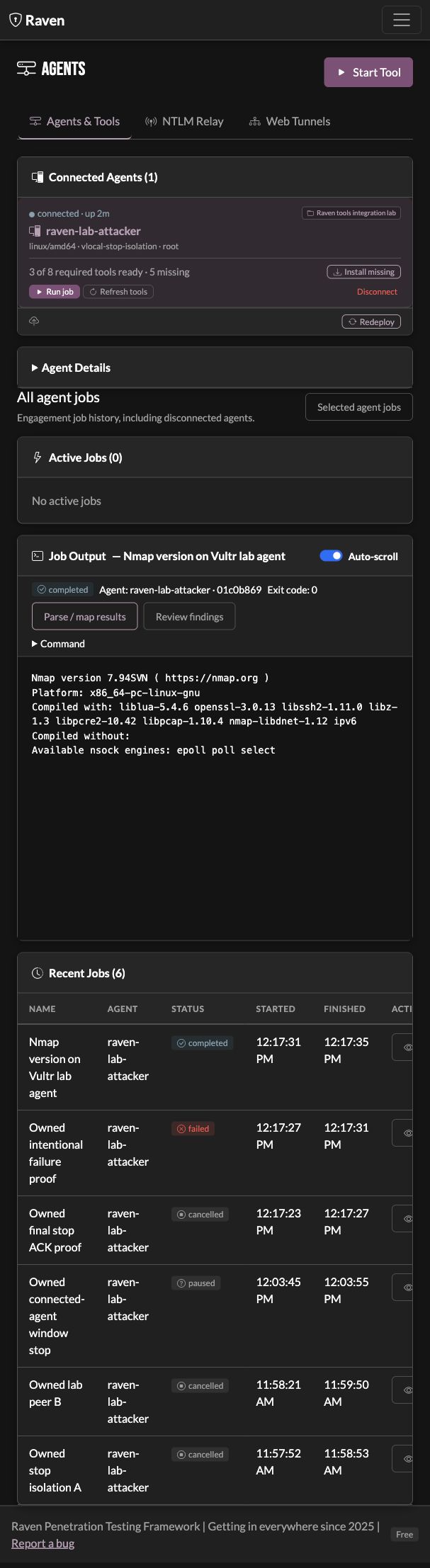
- Tool detection: on connect, the agent reports installed tools (Responder, Impacket, and others). The dashboard marks missing tools so you can check readiness before launching.
- Real-time streaming: job output streams back over WebSocket as it runs.
- Credential capture: hashes parsed out of tool output are pulled into your Credentials Library automatically.
- Job management: select an agent to see its own runs and streamed output. All agent jobs includes history from disconnected agents. A research View job link opens this workspace with its run selected.
Run the agent by hand
Deploying from the dashboard is the normal path. For manual placement, choose the
host's operating system and architecture, prepare its binary, and use the download
control. Keep the filename shown in the download, such as
raven-agent-linux-amd64. The callback, server token, and engagement are launch
settings; they are not embedded in the downloaded executable.
When the agent and Raven server run on the same host, this example uses the server owner's token and explicitly selects the engagement:
chmod +x ./raven-agent-linux-amd64
sudo ./raven-agent-linux-amd64 \
  -server ws://127.0.0.1:8080/ws/agent \
  -token "$(cat ~/.raven/agent_token)" \
  -engagement 'Example Lab'
The defaults now match. Both the agent and raven-server start use port
8080, and the agent dials 127.0.0.1 rather than localhost, so the
command above works as-is against a default server. If you started the server
on another port, pass it:
sudo ./raven-agent-linux-amd64 \
  -server ws://127.0.0.1:9000/ws/agent \
  -token "$(cat ~/.raven/agent_token)" \
  -engagement 'Example Lab'
Use 127.0.0.1, not localhost, if you write the URL by hand. On a host
with IPv6 enabled, localhost resolves to ::1 while the server binds IPv4
127.0.0.1, so the agent gets connection refused even on the correct port.
The token is required. It is per-server, stored at ~/.raven/agent_token,
and printable with raven-server auth agent-token --raw. Read it as the user
running the server; if you sudo the agent, the token still has to come from
that user's home, as in the command above. This is the execution-agent token,
not a Chamber Door pairing token or an AI provider key.
Use the engagement's client/display name for -engagement, exactly as shown
in Raven. It is not the engagement folder name or an agent ID. Select that
engagement in the dashboard to see its agent. A connected agent assigned to a
different engagement does not move when you change tabs. Claim is available
for an unclaimed agent; it is not a control for moving an already assigned agent.
Place an agent on another host
The callback URL is interpreted on the agent host. Its 127.0.0.1 is not
your laptop or the Raven server. If there is no direct route back to Raven, use
an approved tunnel or run Raven on the test box and
transfer the engagement later.
This example assumes Raven is running on the controller's loopback port 8080
and the controller can SSH to an approved Linux operator host. Replace the
example host, username, ports, binary filename, and client name for your setup.
It forwards an operator-host loopback port back to Raven without publishing the
single-user dashboard on a network interface.
- On the Raven controller, keep this reverse tunnel running:
ssh -N -T \
  -o ExitOnForwardFailure=yes \
  -o ServerAliveInterval=15 -o ServerAliveCountMax=3 \
  -R 127.0.0.1:18080:127.0.0.1:8080 operator@operator-host
- Read the token from the Raven server owner's account. To prepare a file for your approved secure transfer method, on the controller:
Transfer the downloaded agent binary and this token file to the operator
host. Protect the token file there with chmod 600 raven-agent.token. The
agent does not create a token that can authenticate to a different server.
- On the operator host, start the downloaded binary against the forwarded loopback port:
chmod +x ./raven-agent-linux-amd64
sudo ./raven-agent-linux-amd64 \
  -server ws://127.0.0.1:18080/ws/agent \
  -token "$(cat ./raven-agent.token)" \
  -engagement 'Example Lab'
- In Testing → Agents for Example Lab, wait for a connected agent, check its hostname and tools, then select it. Preparing or connecting the agent has not run an assessment tool. Review the execution machine, interface, targets, and command before starting your first job.
The tunnel must stay alive while the agent uses it. If forwarding is refused or the connection drops, diagnose this connection before changing permissions, firewall rules, or other services. See Recover a lost agent connection.
Jumpbox prerequisites
The Go execution agent currently supports Linux and macOS hosts. A Windows domain controller can be a target reached from a Linux operator agent; running this agent on Windows is not currently supported.
An SSH jumpbox is a Linux host you can reach over SSH (configure host, username, and either an SSH key or password in Settings). Attack tools run on the jumpbox itself, so install them there. A setup script (agent/setup-rta-tools.sh) provisions the common set (impacket ≥ 0.12.0 for ntlmrelayx RPC relay support, Responder, coercer, and friends).
If the SSH key is passphrase-protected, load it into an ssh-agent the Raven server can reach before deploying; otherwise supply a password. See Troubleshooting if a deploy or connection fails.
Execution, callback, proxy and file transfer
These paths solve different parts of a remote workflow. Review the path the particular module or Tools run selects:
| Path | What it does | What to check |
|---|---|---|
| Local / Docker | Runs the check on the Raven host or its local agent | That machine's tools, interfaces, files and route to the targets |
| Direct SSH jumpbox execution | Starts a supported command through the configured jumpbox | Tools and paths on the jumpbox; strict window enforcement refuses this path |
| Connected agent | Runs the reviewed command on the selected agent host and returns output | Connected identity, owning engagement, detected tools and privileges |
| Agent callback / reverse SSH tunnel | Carries the agent's connection back to Raven | The callback is reachable from the agent; the owning tunnel stays alive |
| Supported SOCKS/proxy route | Carries supported client network requests through a proxy | The particular tool supports that route; it does not relocate every native check |
| SSH file transfer for Tools | Stages declared controller files and retrieves a declared artifact | The selected remote host's configured transfer credentials and paths |
An SSH-deployed agent still executes through its callback after deployment.
A connected callback does not provide arbitrary file transfer. For a remote
Tools definition that reads {{targets_file}}, another declared controller
file, or writes {{output_file}}, configure the matching host's file transport
under Settings → Execution → Jumpbox. A local agent sharing Raven's filesystem
and a stdout-only command without declared files do not need that transfer path.
See Files and execution locations.
Connecting an agent does not globally route all bundled modules to it. Use a module's offered agent mode or explicitly choose the agent in Tools or the agent workspace. Keep the target IP separate from the callback, listener IP, and jumpbox address; they can be four different endpoints.
Review a command on its execution machine
Select a connected agent, choose Start agent tool, and review the editable command, agent identity, privileges, interface, and targets. A command draft can come from Cheatsheets or the LOTL reference through Tools. Tool installation and network reachability belong to the machine executing the command.
Testing windows gate launches and request stops from connected agents. Raven waits for completion confirmation before allowing an overlapping restart. A disconnected controller cannot enforce a remote hard deadline; keep that limitation in the rules of engagement.
Strict testing windows require local process execution or a connected Raven agent. Direct SSH command execution is refused in enforcement mode because its remote child-process termination cannot currently be verified. SSH remains available with warnings or with windows disabled.
Review results and preserve the producing run
Select the run in Agents, or choose All agent jobs to include retained history from disconnected agents. A Tools run uses Runs and can also retain the native agent output. After a terminal outcome is confirmed, Parse / map results opens the retained artifact for review. Choose the format that matches the actual output, such as Nmap XML; a console envelope or exit-zero footer is not itself a discovery record.
Supported credential captures are stored in the encrypted Credentials Library. Inspect their source IP, producing job and original evidence separately from a listener's IP. NTLM challenge-responses are captured authentication material, not reusable NT hashes or proof of password recovery. The internal lab walkthrough demonstrates a bounded SMB/LLMNR capture and confirmed stop without treating it as a relay.
For raw output, keep a note or add a finding with accurate evidence and link the real run. Retest finding prepares a new review of its recorded check; the original agent must be available for that execution path. Imported engagement history remains reviewable without launching the original commands.
Recover a lost agent connection
An agent that was connected and then becomes stale or disappears has lost its callback or changed visibility; this is different from a missing executable.
- Confirm the Raven controller is still running on the original port. Select the agent's owning engagement; a different engagement can legitimately show 0 agents.
- On the operator host, inspect the existing agent's terminal or log. Confirm its process is running, its callback URL is unchanged, and its token belongs to this Raven server. Do not paste the token into findings or support logs.
- If using a tunnel, inspect the terminal that owns it. Restore the same approved forwarding path if it ended. Confirm both the forwarded port on the operator host and the Raven destination port match the launch command.
- Wait for the agent to show Connected, then select it again and check its identity and tools. A disabled Start button means there is no available connected executor; preparing a command does not prove the agent is ready.
- If a job was already running when connectivity was lost, inspect its existing run before launching another. A stop request is not proof of process exit. Raven keeps an unconfirmed stop unresolved and prevents an overlapping restart. Restore the original agent connection and wait for its completion acknowledgement; starting a second agent does not confirm the first job's exit.
Do not expand network access or change unrelated credentials to make an agent reappear. If the approved callback cannot be restored, keep the run's outcome unresolved and verify it on its execution host. See Testing windows and Troubleshooting.
A remote viewer with no direct connection
When you can only enter the client's test box through a remote viewer, run Raven on a supported installation there and keep the engagement there during testing. On Windows, this means the documented Docker setup is available; an RDP session alone does not provide a supported Windows execution agent. If the supplied box cannot run that setup, agree on a supported operator host rather than assuming the Linux agent executable will run on Windows. Export an encrypted engagement bundle, transfer the file using the client-approved method, and import it into local Raven for reporting. This does not require a jumpbox connection back to your laptop or an inbound listener in the client network.