AI Analysis
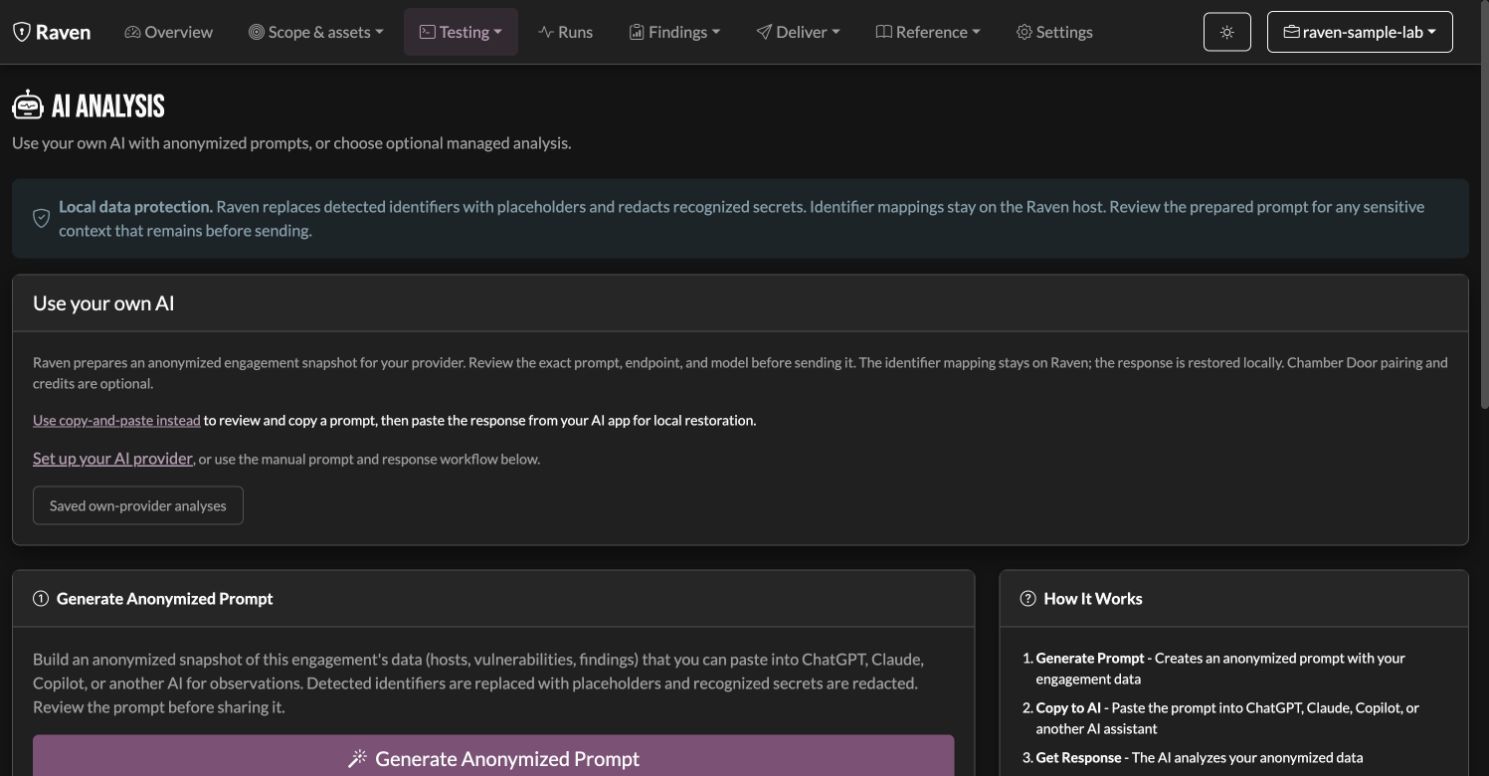
AI is optional. Individual testing, findings, imports, exports, and the basic report work without an account or model call. Open AI Analysis when you want to use one of these paths:
| Path | Request destination | Pairing and costs |
|---|---|---|
| Manual prompt and response | You copy the reviewed prompt to the model you choose | No Chamber Door pairing or credits; any model-provider charges are separate |
| Native BYO engagement analysis | Saved OpenAI, Claude, Gemini, or compatible API server, including a compatible local endpoint | Your provider account; no Chamber Door credits |
| Managed Raven AI | Chamber Door's managed service | Paired account with available managed AI credits |
Native BYO supports engagement-snapshot text analysis in the individual web dashboard. Managed advisor, chat, tool-use loops, finding drafts, and report writing retain the managed path. Saving a BYO provider does not redirect those managed workflows. The REPL keeps its existing managed AI commands. See also Offline Mode.
Native BYO analysis
- Open Settings → AI & privacy. Choose OpenAI, Claude, Gemini, or a local
or other compatible API server. Enter the model name supplied by that
provider and its API key when required. Hosted presets use their fixed
endpoints; custom compatible endpoints may run on the Raven host or another
machine and may not need a key. Use the API base URL, including
/v1when your server requires it. - Save the settings. They apply to this Raven installation across engagements. The saved key is held in a private file on the Raven host and is not returned to the settings page. It is not encrypted by the credential database key. Changing the provider or endpoint clears the old key unless you supply a replacement.
- Optionally choose Test provider connection. This sends a small test request without engagement data; provider charges may apply. Saving the settings alone makes no provider request.
- In AI Analysis, choose Prepare anonymized request. An optional analysis instruction is anonymized with the engagement snapshot. Review the exact prompt, endpoint, and model shown before choosing to send it.
- Raven sends the reviewed text directly to the saved provider. The identifier mapping is not included. Recognized response placeholders are restored on the Raven host, and the analysis is saved with the engagement. If saving fails after a response is received, copy that response before leaving the page.
A prepared review expires after 15 minutes and can be sent once. Changed provider settings require a new review. A failed privacy check stops the request before sending; after a failed provider request, prepare a new review before retrying.
Provider settings
| Choice | API format | Output limit and authentication |
|---|---|---|
| OpenAI | OpenAI Chat Completions | API key and explicit output limit |
| Claude (Anthropic) | Native Claude Messages | API key and explicit output limit |
| Gemini | Google's OpenAI-compatible endpoint | Gemini API key; an explicit limit or the provider default |
| Local or other compatible API | OpenAI-compatible Chat Completions | Key if the server requires one; an explicit limit or the provider default |
Only supported text completions are used. Raven does not request tools or automatically fall back to another provider. Choosing the provider's default output limit omits that parameter, including in connection tests; its server settings then govern output length and any token charges. OpenAI and Claude require a configured limit in Raven.
API access and AI-app subscriptions are separate. This beta has no native Copilot login/SDK integration or subscription-based Claude/ChatGPT connector. Use the manual exchange below with those apps. An unsupported API format needs its own adapter; changing its URL alone does not make it compatible.
Manual prompt and response
Generate the manual prompt in AI Analysis, review the text, and copy it to your chosen model. Paste the response back into Raven to restore recognized placeholders. The manual prompt contains engagement data and a generic analysis request; Raven's structured managed methodology is supplied through the managed service. No Chamber Door pairing or credits are required for the manual flow.
Use copy-and-paste instead remains available with a configured provider and a paired account, including after a failed direct request. Generate a fresh manual prompt, inspect it, copy it into the AI app you choose, and paste its text response back into Raven. The failed direct review cannot be sent again. No provider settings or API key are needed for the manual workflow.
Privacy and review limits
Raven replaces known client, host, domain, IP, email, and account identifiers
with placeholders such as TARGET-CLIENT, host-1, and TARGET-IP-1. It
redacts recognized credential formats. The reversible identifier mapping
stays with the engagement on the Raven host; redacted secrets are not restored.
These checks reduce identifying content but cannot guarantee that every sensitive detail is removed. Unregistered names, unusual secret formats, and identifying technical context may remain. Save engagement and vendor privacy rules, preview fictional text locally, and inspect the request before sharing it. Your chosen provider's data handling applies to the context you send.
The local redaction preview makes no AI-provider request and uses saved rules. It is separate from the complete outgoing AI request. Loading an older mapping can run compatibility migrations and create private backup files. A known numbered identifier inside a longer token can stop processing locally; register the full asset name or complete sensitive term rather than guessing a partial replacement.
Managed advisor and chat
Managed requests use your paired Chamber Door account. Raven processes the selected context on the Raven host, and Chamber Door supplies the methodology, calls the managed model, and meters usage against your credit balance.
The managed chat on the AI Analysis page uses the engagement you have open. You can:
- Ask the advisor what to do next. It looks at your current hosts, services, and findings and suggests methodology-grounded next steps.
- Have it run modules for you. The advisor can launch scans and read the results back in a tool-use loop, then reason over what came out.
- Draft findings and report narratives. Turn raw evidence into write-ups, executive summaries, and remediation guidance.
Autopilot vs. step-through
A single chat message usually triggers many Claude calls. It works iteratively, running a module, reading the output, deciding the next move. Two modes control how aggressive that loop is:
- Autopilot lets the advisor iterate freely (run a module, analyze, run the next) until it has an answer. Good for "do a full external recon" where you don't want to babysit each step, but it burns budget faster.
- Step-through holds the advisor back from running modules on its own, so you stay in the loop on each action.
History
Past conversations are saved per engagement and reachable from the History view, so you can revisit an analysis without re-running (and re-paying for) it.
Budget
Managed AI usage is metered server-side against your credit balance. Pay-as-you-go credits do not expire; subscription allowances are also available. A managed tool-use conversation can make several model calls, so usage adds up per iteration. Native BYO usage is charged by your chosen provider instead.
Your current spend and remaining credits are on the dashboard at app.chamberdoorsecurity.com. To stretch a budget: ask focused questions, prefer step-through for exploratory work, and don't re-run analyses you've already saved.
If you hit the ceiling, AI calls return 402 BUDGET_EXHAUSTED. See Troubleshooting.
Reviewing AI output
Treat AI output as a draft to verify:
- Verify technical claims against your own evidence.
- Confirm any host, CVE, or IP the model mentions actually appears in your data. (Raven marks content it can't trace back to your engagement, but read critically anyway.)
- Adjust tone and specifics before anything reaches a client deliverable.