Move an Engagement Between Raven Instances
Use an engagement bundle when you test on a client-provided machine or through a remote viewer, then need to continue reporting in Raven on your own machine. The instances do not need a direct connection.
Export on the test box
- Stop active runs and open Deliver → Export.
- In Move this engagement to another Raven, enter and confirm a bundle password of at least 12 characters.
- Download the
.raven-engagementfile and move it using the client's approved file-transfer method. Keep the password separately.
The bundle includes a consistent database snapshot, scope, findings, hosts, notes, evidence, and command logs. It is authenticated and encrypted with the bundle password. Captured credential fields are protected using a bundle-derived key; Raven's installation encryption key is not exported. Provider credentials, jumpbox access secrets, server authentication, and raw application source are excluded.
The CSV ZIP and report exports remain useful deliverables, but they are not complete Raven workspaces.
Import on the reporting machine
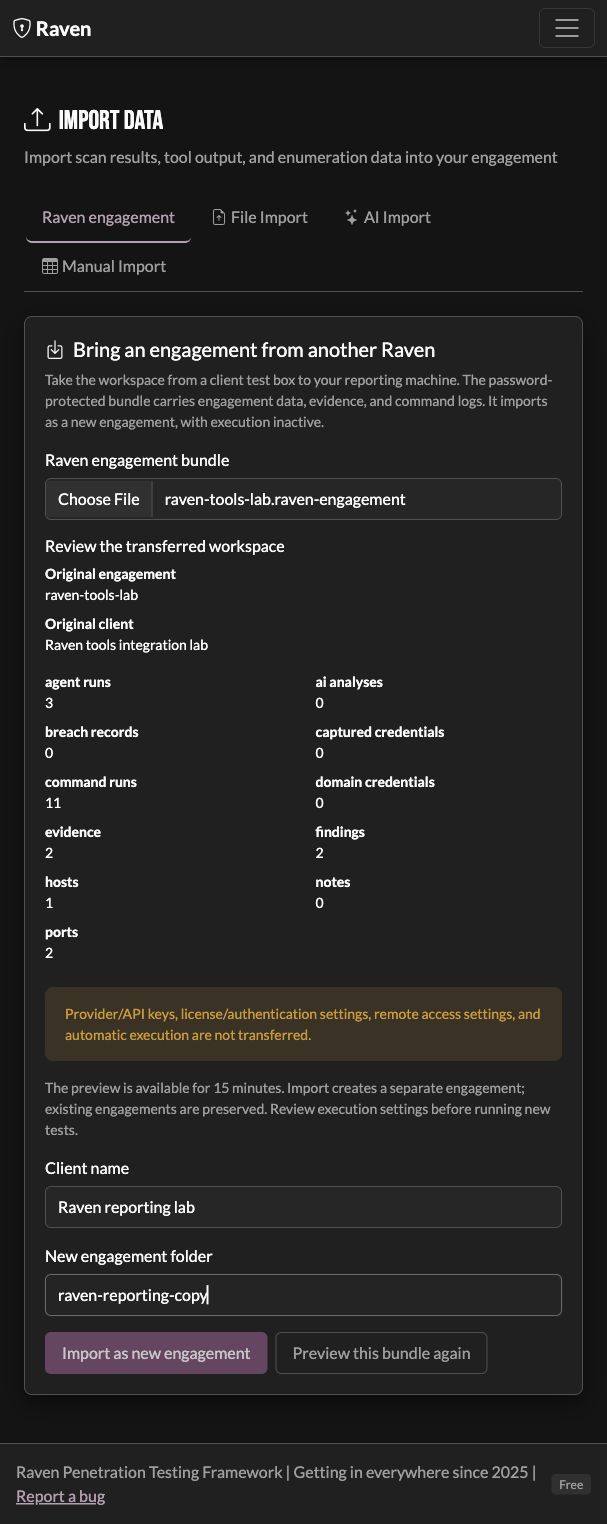
- Open Scope & assets → Import results → Raven engagement.
- Choose the bundle, enter its password, and select Preview engagement bundle.
- Review the data counts and warnings. Choose a client name and a new engagement folder, then Import as new engagement.
- Open the imported engagement to review evidence, findings, and reports.
The preview lasts 15 minutes. Import creates a new directory and refuses to overwrite an existing engagement. Saved paths inside the source workspace are rebased to the destination. Captured credential fields are re-encrypted with the receiving Raven installation's credential encryption key.
Imported active, queued, and paused commands remain inactive. Jumpbox and provider connections need configuration on the new machine. Importing a bundle does not resume testing or replay an attack.
Bundles support up to 256 MiB encrypted, with limits on expanded size and file count. An oversized or incomplete export fails clearly rather than silently omitting evidence. Keep a protected copy of the original workspace until you have checked the imported engagement.