Research & Reference
Open Testing → Testing workspace → Research the next check, or the Reference menu, to look up a technique without losing the engagement. Research can lead to a command, a manual observation, or a decision not to run a check. It does not start testing by itself.
Cheatsheets
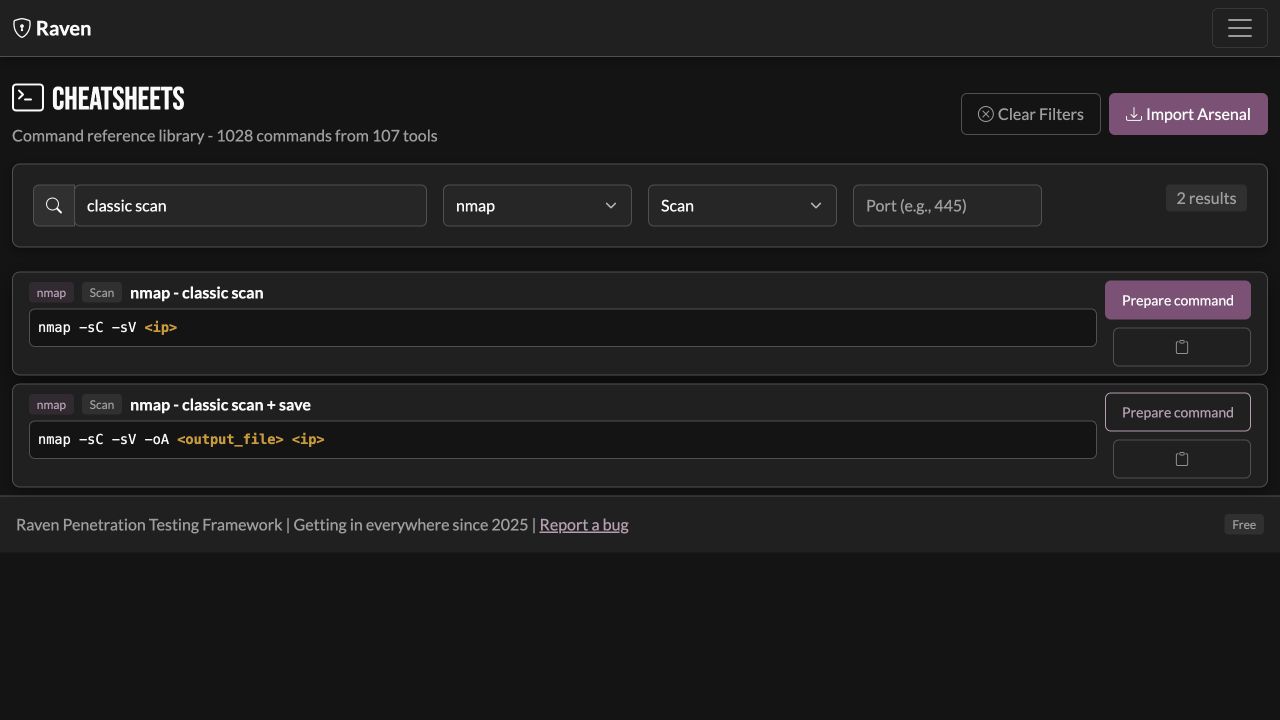
Search the command library by text, tool, category, or port. Expand long commands to read the whole example. Copy command keeps the existing terminal workflow. Prepare command opens an editable draft in Tools for this engagement. Replace example variables, choose the execution machine and targets, then review before running.
Use your browser's Back button after preparing a command to return to the same search, filters, and expanded reference. LOTL also restores its selected technique and tab, and Agents restores the selected job and history view after opening Parse / map results. These views belong to the selected engagement; switching engagements clears their selections. Clear Filters resets the Cheatsheets search and expanded reference together.
The library is a reference: importing a cheatsheet does not install its tool. Arsenal import and refresh controls manage the reference data. Prepare your library before entering a network where external downloads are unavailable.
From a reference to a recorded check
- Choose Prepare command, then read the complete draft in Tools. Replace example domains, interface names, usernames, paths and listener addresses. An example command is not automatically rewritten to the engagement's scope.
- Choose Run on. A local file, interface or installed executable belongs to that execution machine. For a connected agent, check its identity and detected tools in Agents. An SSH callback tunnel and a file-transfer connection serve different purposes.
- Declare the targets and review the command, inputs and frozen target list. Use a saved tool definition for a reusable wrapper, controller-file staging or a deterministic output parser. Review the target service's scheme and port; a hostname alone is not a full web-service URL.
- Start the reviewed check only when its prerequisites and testing window fit. Follow Runs for a managed Tools run, or Agents → All agent jobs for direct agent history. Inspect exit status, stderr and original output.
- After completion, Parse / map results shows the saved output for review. A raw text result can remain an observation with zero structured discoveries or findings. Import only the supported records you choose; an HTTP success or tool banner is not itself a vulnerability.
- Keep an accurate note or finding with the relevant evidence. Link the actual producing run when preparing a finding retest; Raven needs that recorded check to prepare a repeatable review.
If a reference's prerequisite cannot be met, record that coverage limitation instead of treating no output as a passed check. For bundled checks, each module's Help explains its target source, dependencies and expected result view.
LOLBins & techniques
The LOTL library includes platform references such as LOLBAS, GTFOBins, LOOBins, WADComs, LOLDrivers, and HijackLibs, plus supported script modules. Search and filter to find a technique that applies to your platform. Reference entries can be copied or prepared as Tools drafts.
For a script module, inspect the generated script and execution method, then choose a supported execution host. The execution uses the module and method captured by that preview. A reference snippet is not proof that the target is vulnerable; review prerequisites, privileges, and the command before using it.
The supplied LOTL script modules need a Windows execution host. Raven's bundled agent currently supports Linux and macOS, so copy the reviewed Windows script for an approved manual workflow when there is no supported Windows executor. A Windows reference does not become a Linux-agent command by selecting that agent. Linux/macOS reference snippets can still be prepared as explicit Tools drafts when they fit that machine.
View job opens the agent's run and output. Keep useful observations in Notes or a finding with evidence. Testing windows apply to agent launches just as they do to supported tool execution.
Refreshing a reference library downloads reference data; it does not run a target check. Use the existing downloaded library in an offline engagement and retain the source of the technique you reviewed.
Methodology
Use methodology as a record of coverage and an aid to choosing tests. It is not an instruction to execute every available module. Discoveries, client scope, time, and your judgment determine the next useful action.