Bring Your Own Tools
A Raven tool definition wraps a command you choose. It records its inputs, execution machine, output artifact, and optional deterministic parser. Importing the YAML does not install or execute the program. The executable, dependencies, interfaces, and privileges must be available on the machine selected in Run on.
Use Testing → Tools → Import a tool definition. Upload a .yaml or .yml
file, or paste the definition and give it a Definition filename. Import keeps
an existing file: choose another filename for a copy, or select the existing tool
and use Update this saved tool. Each engagement keeps its own definitions.
Minimal wrapper
Save this example as http-status.yaml. It makes one bounded GET request per
selected service URL and retains the response status as raw output. Select the
URLs in Tools and choose the execution machine before Review run.
name: HTTP status check
description: Bounded GET requests with status and effective URL in the run log.
tool: curl
tier: free
target_kind: urls
alternative_to: host_discovery
inputs:
  - name: timeout
    type: number
    default: 15
    description: Maximum seconds per request.
command: |
  set -e
  while IFS= read -r url || [ -n "$url" ]; do
    [ -n "$url" ] || continue
    curl --silent --show-error --connect-timeout 5 --max-time {{timeout|quote}} \
      --output /dev/null --write-out '%{http_code} %{url_effective}\n' "$url"
  done < {{targets_file|quote}}
output:
  format: text
  file: http-status.txt
parser:
  type: text
findings_mapping:
  enabled: false
Raw output stays with the run; it does not automatically become a finding or prove a vulnerability. This command reads the generated target file and uses the selected URLs directly. Review explicit destinations in other scripts: declaring a target snapshot does not rewrite arbitrary shell commands.
For a stdout-only agent run, inspect its output in Runs or the agent's job console. Parse / map results with the text parser shows the retained output as raw observations; zero hosts, ports, paths, or findings is expected when no structured mapping was selected. A printed HTTP status or SMB share can support your review without becoming a vulnerability automatically.
Review run resolves the inputs and shows the command, machine, target count, and file paths. Start reviewed run rechecks scope and testing-window admission. After completion, use Parse / map results and Import reviewed results. Raw observations can also support a manually added finding linked to this run.
Definition fields
| Field | Purpose |
|---|---|
name, description, tool |
Display name, operator guidance, and the executable's identity |
target_kind |
hosts, urls, or none for an offline helper |
inputs |
Named form values, their type, defaults, and descriptions |
command |
A shell command or multiline script, rendered with Jinja variables |
output.file |
A simple output filename, or a filename template using declared inputs |
parser |
Raw text, JSON lines, JSONPath, named-group regex, or a supported built-in parser |
findings_mapping |
An optional explicit rule for creating findings from parsed observations |
alternative_to |
The bundled module for which this tool can be offered as a per-run alternative |
Inputs support string, number, boolean, choice, ip, url, and file.
For a choice input, declare choices: [quick, thorough]. A required input uses
required: true. Inputs declared as ip or url participate in target review.
Use {{name|quote}} for a value placed in a shell argument; the filter quotes the
rendered value, including spaces and shell punctuation.
When you save a tool from Tools, its current declared input values become reusable defaults. Generated target and output paths remain specific to each run. Updating defaults keeps earlier reviewed and completed runs unchanged.
Raven supplies {{targets_file}} and {{output_file}}; they do not need entries
in inputs. The target file contains selected hosts or complete HTTP/HTTPS URLs,
including ports. If your tool writes a structured result file, pass
{{output_file|quote}} to its output flag. Raven retrieves that declared artifact
for review. A text tool without an output-file variable keeps its stdout log.
Files and execution locations
| Input choice | Meaning |
|---|---|
type: file |
An existing readable file on the Raven controller; declared inputs are staged for supported remote/agent execution |
type: string containing a path |
A path you explicitly manage on the execution host; Raven does not copy that file |
{{output_file}} |
A unique, Raven-owned artifact path for this run; supported executors retrieve the result |
For example, a remote wordlist path can be a string input when the wordlist already exists on the agent. Use a file input when you want to stage a controller wordlist. Configure the transport required for file staging; a connected agent's stdout connection alone does not provide arbitrary file transfer.
For an agent on another host, configure that host's SSH file transport in Settings → Execution → Jumpbox before reviewing a tool that reads a generated target file or produces an artifact. Raven refuses preparation when the required transport is missing and offers the execution settings link. A local agent with the same filesystem, or a command without declared input/output files, does not need this transfer path. The SSH credentials authenticate file transfer; the selected agent still executes the reviewed command.
Keep target credentials out of the definition. For SMBclient, a private auth file
and smbclient -A {{auth_file|quote}} avoid putting user%password in command
arguments. Choose whether that path is a controller file input or an existing
execution-host path. Protect the file on that machine and use the account agreed
for the engagement.
Structured discovery
Masscan has a native discovery parser. This wrapper writes the actual JSON output to Raven's unique artifact path:
name: Masscan port discovery
tool: masscan
tier: free
target_kind: hosts
alternative_to: nmap
inputs:
  - name: ports
    type: string
    default: "80,443,445,8080"
  - name: rate
    type: number
    default: 100
command: >-
  masscan -iL {{targets_file|quote}} -p{{ports|quote}}
  --rate {{rate|quote}} -oJ {{output_file|quote}}
output:
  format: json
  file: masscan-ports.json
parser:
  type: builtin
  builtin: masscan
findings_mapping:
  enabled: false
Review interface/routing options and raw-socket privileges for the chosen machine. The imported ports are discovery results; use service enumeration for product and version identification. This wrapper is an alternative to port discovery, with Nmap still available for detailed checks.
Supported profile built-ins include nmap, masscan, httpx, ffuf, subfinder,
dnsx, tlsx, and portscan. FFUF's native JSON parser imports responding URLs,
status, size, and content type as discovered paths. In the result review, select
Paths, then inspect Hosts → Discovered paths. A responding path is not a
finding. FFUF JSON's results array preserves the individual response records.
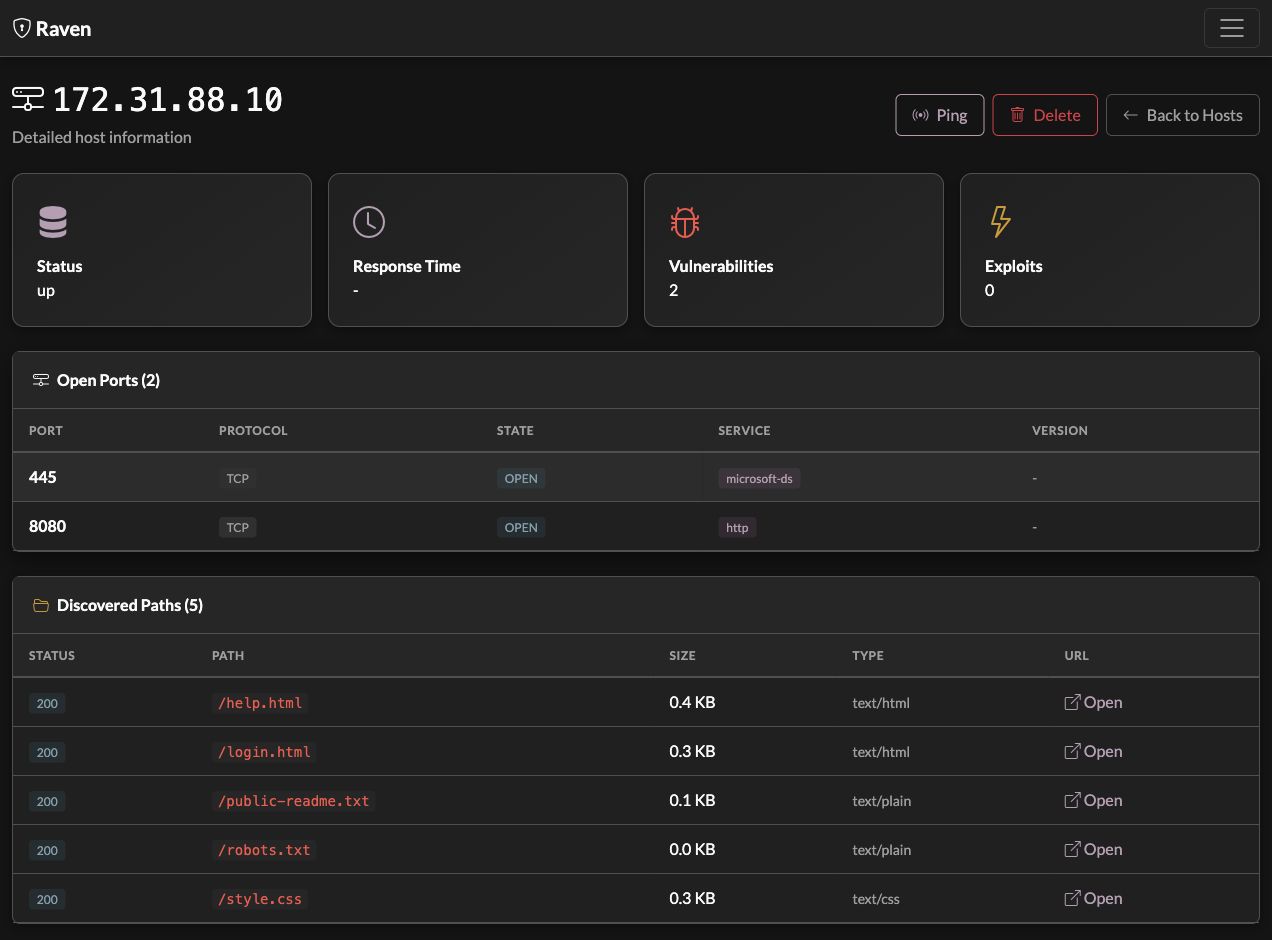
This lab example imported five responding paths on port 8080. Deselecting Paths kept the original artifact without adding those paths to the inventory; selecting it in a later review added them. The existing findings stayed unchanged.
For a JSON object containing a custom result array, use parser.type: json_path
with results_path: "$.results[*]". For line-oriented JSON objects, use
parser.type: jsonl. A regex parser uses named groups such as
(?P<host>...) and (?P<port>...); unmapped fields remain observations for review.
An artifact that a parser cannot map remains available with the run.
Map verified observations to findings
Your own script can emit one JSON object per line, using fields such as:
{"host":"192.0.2.10","port":8443,"protocol":"tcp","service":"https","confirmed":true,"observation":"An operator-defined check passed its detection rule."}
The host must be an address or hostname; the port must be an integer from 1 to
65535. Use protocol: tcp or udp. A url can supply a hostname, but explicit
host and port fields make the affected service clear. Fields named title
are treated as proposed findings, so omit them for discovery-only records.
The following definition expects your script to write those JSON lines. Replace the executable path with your own installed checker:
name: Reviewed custom observation
tool: my-checker
tier: free
target_kind: urls
command: >-
  /opt/my-tools/my-checker --targets {{targets_file|quote}}
  --jsonl {{output_file|quote}}
output:
  format: jsonl
  file: observations.jsonl
parser:
  type: jsonl
findings_mapping:
  enabled: true
  finding_filter: "confirmed == True"
  title_template: "Verified custom observation on {{host}}:{{port}}"
  severity: info
  description_template: "{{observation}}"
  evidence_template: "Affected service: {{host}}:{{port}}"
  affected_hosts_field: host
  affected_ports_field: port
Mapping templates read fields from each result record. An affected-host or
affected-port mapping names a field; it does not extract arbitrary values from
prose. Other optional mappings include severity_field, severity_map,
cvss_field, and cve_field. Review whether your detection rule supports the
title, severity, and evidence before importing. These mappings run locally
without an AI request.
Tools keeps imports under review. Existing bundled scanners and the older YAML module execution path retain their automatic import behavior. Saving a finding mapping does not switch a Tools run to automatic import.
Offer an alternative for one run
alternative_to uses the bundled module's identifier. Examples:
| Bundled operation | Identifier |
|---|---|
| Nmap port discovery | nmap |
| Host Discovery (Nmap liveness) | host_discovery |
| Directory/path discovery | ffuf |
| SMB enumeration | smb_enum |
| SMB signing check | smb_signing |
On a bundled module, choose Use my tool to prepare a matching saved definition. Inspect the transferred targets and execution machine before running it. This choice applies to that run. It does not globally replace bundled modules or change workflow steps.
The minimal HTTP-status example uses host_discovery to offer a web check at
that card. The bundled Host Discovery module uses Nmap liveness probes; checking
an HTTP URL is narrower and does not provide equivalent host-discovery coverage.
Use the module reference to compare target sources and
results before choosing an alternative.
Custom tools in workflows
A workflow's custom-tool step uses the existing foreground execution path on the Raven host. With Enforce window enabled, closing the owning engagement's window stops that process group, retains partial output, and halts later steps for review. Cancelling the workflow also stops its foreground custom tool. Warn only allows it to continue.
This path does not select a connected agent or inherit a preceding step's smart target selection. Declare and review its inputs explicitly. It does not resume from a tool checkpoint or automatically restart an interrupted workflow. See Testing Windows for controller and executor requirements.
Evidence and retesting
Earlier runs retain their original command, inputs, parser, mapping, and artifact when you edit a saved tool. Import reviewed results to attach the producing run and artifact custody to supported findings. Retest finding uses that recorded check for a new review; inspect its targets and executor before running it.
Raw output and independently imported files also remain useful. Add a finding from a raw observation and link a real saved run when you need a repeatable check. Raven does not invent a producing command for an uploaded output file. A saved execution-host file path cannot guarantee that the file's bytes stayed unchanged; verify an externally managed wordlist or auth file before the rerun.
See Testing Workspace for the engagement flow and Remote Agent for execution placement.